
How to Use Tabs Like Index Cards — and Never Forget a Thing Again
You remember index cards.
3×5. Sharpie or pen. One idea per card. Stackable. Shuffleable. Usable.
They were humble. They were tactile. But most importantly, they were intentional.
An index card wasn’t a placeholder. It was a commitment.
It said: This matters. This is worth holding onto. This is part of the structure I’m building.
Now fast forward.
Open your browser.
Look at your tabs.
All of them.
What are they?
Pages you didn’t want to forget. Things you want to reference later. Half-saved thoughts from a podcast or article. A tool you plan to test. A paragraph you loved. A quote you might use.
They’re your new index cards.
But here’s the difference: you’re not using them like it.
You’re not labeling them.
You’re not organizing them.
You’re not stacking them in a way that gives you leverage.
Instead, you’re leaving them in the tab bar. Undifferentiated. Fragile. Forgettable.
And eventually? They vanish. You close the wrong one. Your browser crashes. Your session resets. And the thought’s gone.
We All Have Good Ideas. Few of Us Capture Them Properly.
It’s not that your work isn’t good. It’s that your workflow loses the plot.
You find something important and think, “Oh, I’ll get back to that.”
But ideas have a half-life.
And without a system that catches them mid-air, they decay.
The browser wasn’t built to capture meaning.
It was built to display pages.
And tabs weren’t built to store context. They were built for quick access – nothing more.
So what do we do?
We keep them open. One after the other. Stacking. Piling. Promising ourselves that “later” will bring clarity.
But it doesn’t.
Because you’re not working with ideas.
You’re surrounded by them.
And that’s the problem.
Reframe Your Browser: It’s Your Desk, Not Your Junk Drawer
Imagine if you wrote down all your ideas on sticky notes… and then stuck them on top of each other. Every day. Without labels.
That’s your browser tab bar.
We’ve taken one of the most powerful environments in our workday – the browser – and let it become the most disorganized.
That changes now.
With one shift.
Treat your tabs like index cards.
Index Cards Work Because They Force a Decision
You write one thought per card.
You give it a title.
You file it in a box.
And when the time comes? You pull it out. You use it. You build with it.
That’s structure. That’s how books get written. Products get built. Arguments get made. Presentations get nailed.
Because the thinking was captured in units. In manageable, labeled, retrievable units.
Not vague “I’ll come back to it” intentions.
But here’s what this is declarations.
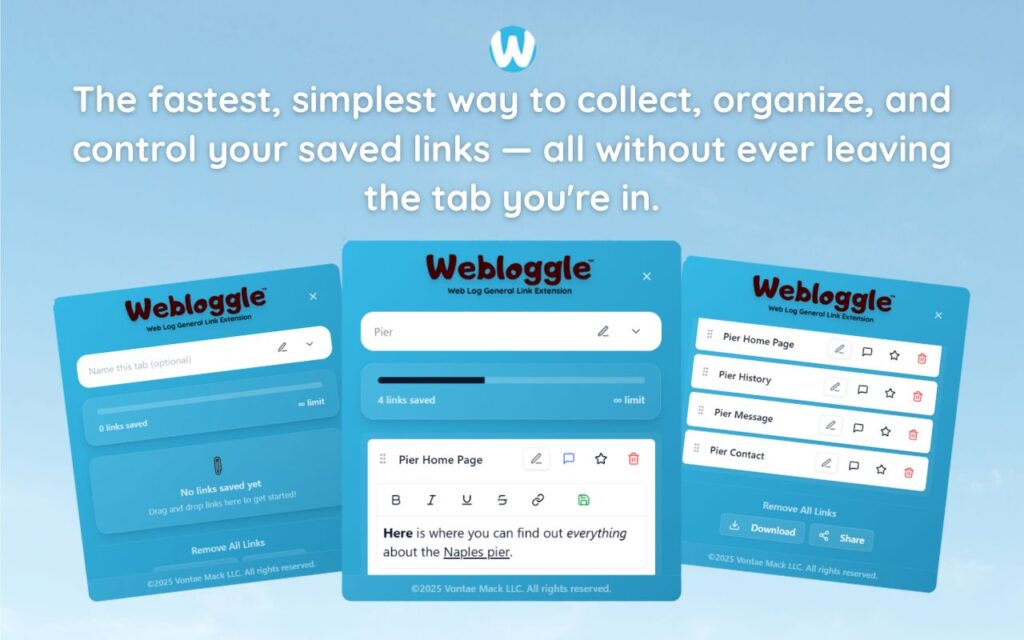
That’s the same mindset Webloggle brings to your browser.
Webloggle: Index Cards for the Internet
Here’s the rhythm:
You’re mid-flow. You find something useful.
You drag the tab to Webloggle.
A little box appears.
You type the name: “Customer onboarding flow,” “Study: B2B buyer behavior,” “Pricing strategy idea.”
You save it to a box: “Client A Pitch,” “Marketing Tactics,” “Q4 Roadmap.”
You close the tab.
The thought isn’t lost. It’s filed.
It’s labeled.
It’s ready.
It’s yours.
This is not tab management.
This is idea stewardship.
The Discipline of Labeling Is the Path to Clarity
When you’re forced to name a tab, you ask a powerful question:
Why did I open this?
That alone builds clarity.
And when you give it a name, you create recall.
Suddenly your work isn’t a swirl of half-memories.
It’s a living archive of your thinking – on demand, on purpose.
That’s what makes the best thinkers so effective.
They don’t remember everything.
They build systems that do.
Don’t Drown in Tabs. Build With Them.
You don’t need to open fewer tabs.
You need to use them better.
Treat each one like an idea worth remembering.
Name it. Store it. Close it.
And move on.
Because what you’re building isn’t just a clean browser.
It’s a clean mind.
One that isn’t spending its energy trying to remember what matters.
One that’s freed up to focus on the next thing.
The real thing.
Final Word
The next time you open a tab, ask yourself:
Is this worth remembering?
If the answer is yes, treat it like it matters.
Don’t hope your browser will remember.
Don’t trust yourself to get back to it.
Capture it. Name it. Save it.
That’s how professionals operate.
That’s how ideas turn into impact.
And that’s how you stop losing the thread- one digital index card at a time.
Free Version
Try Webloggle Free
-
Collect In-tab Links
Drag and drop links into icon or box, right click to save.
-
Edit Link Titles
Name your links whatever you'd like.
-
Create Webloggle Bookmarks Folder
Click the star to create bookmarks of saved links.
-
Limited To The Main Tab Only
Upgrade to Webloggle Pro to use unlimited Tabs.
MOST POPULAR
Webloggle Pro offers you complete control over your tabs.
-
Collect In-tab Links
Drag and drop links into the icon, box, right click to save.
-
Edit Link Titles
Pro offers more robust link naming.
-
Create Webloggle Bookmarks Folder
Click the star to create bookmarks of saved links.
-
Add unlimited notes via WYSIWYG editor.
Bold, Underline, Italics, More Links? Webloggle Pro has you covered!
-
Name each tab individually
Name tab boxes anything you'd like.
-
Choose Tabs by Dropdown
Need to save a link in a different named Tab? With Webloggle Pro you can!
-
Download Your Saved Tabs To Your Computer - Links, Notes, Everything
Webloggle Pro sets your mind at ease with the ability to save all your necessary links, notes, etc to your own computer.
-
Share With Anyone!
Use the Share button in Webloggle Pro to embed your tab information practically anywhere!
Monthly Plan
Webloggle's Monthly Plan offers you complete control over your tabs.
-
Everything in the Yearly Plan is included.
This monthly plan offers everything available in the yearly plan.
