
“Why a Chrome Extension Might Be the To-Do System You’ve Actually Needed All Along”
There’s nothing wrong with Trello. It’s solid, visual, dependable, and great for team projects. But here’s the truth most people don’t say out loud: Trello is built for project management, not for real-time browsing, notetaking, and keeping your daily digital life organized as you move from tab to tab, task to task.
Webloggle steps into a completely different lane.
Trello asks you to stop what you’re doing and go manage your tasks.
Webloggle works in the moment, exactly where your work already happens – your browser.
No switching apps.
No logging in.
No extra dashboard to organize your dashboard.
No pressure to maintain a whole system when all you really needed was “don’t lose this link” and “remember this note.”
Webloggle captures the flow of your day without disrupting it.
Where Trello Makes You Plan, Webloggle Helps You Move
Trello is great for brainstorming, launching products, and keeping teams aligned. But if you’ve ever tried using Trello for your personal “don’t forget this” list… it gets clunky fast.
Cards.
Boards.
Columns.
Checklists.
Due dates.
Notifications.
And if you don’t keep up with it religiously, the whole thing collapses into a pile of overdue tasks and digital guilt.
Webloggle takes the opposite approach:
• You’re reading something important → Save it instantly.
• You want to remember why it mattered → Add a note.
• You want to come back later → It’s already there waiting for you.
• You open 40 tabs because inspiration hit → Webloggle becomes the calm center that holds it all together.
You stay present, not juggling systems.
Trello Lives in the Cloud. Webloggle Lives on Your Machine.
This is a huge difference – and it’s why Webloggle feels so fast and personal.
Trello requires:
• an account
• a login
• synced boards
• cloud storage
• structured data entry
• WiFi or mobile data
Webloggle requires none of it.
There are no accounts.
There’s no server.
Nothing leaves your computer.
It’s private, instant, and frictionless.
Your browsing becomes lighter, not heavier.
Trello Uses Boards. Webloggle Uses Your Actual Tabs.
Here’s the magic:
In Trello, a card is an abstract representation of a task.
In Webloggle, a link is the task.
Label a tab → it becomes your category.
Add notes → you’ve created your context.
Save multiple items → it becomes a dropdown list, just like a Trello board… but without having to build a Trello board.
It’s project management without the project manager.
Trello Helps You Organize Big Things. Webloggle Helps You Organize Today.
If you’re working with teams, building workflows, or managing long-term initiatives, Trello is fantastic.
But most people aren’t trying to build a corporation inside their browser.
They’re trying to keep track of:
• research
• recipes
• client links
• ideas
• things to buy
• things to fix
• notes they don’t want to lose
• articles they want to read later
• random inspiration that hits at midnight
This is where Webloggle shines – because it captures the small stuff that becomes the big stuff.
Trello Makes You Commit. Webloggle Makes It Effortless.
With Trello, you have to participate in the system.
With Webloggle, the system quietly works for you.
There’s no setup.
No onboarding.
No structure required.
Nothing to “manage.”
Just you, your tabs, and a tool that keeps everything tidy, remembered, and ready.
Webloggle becomes invisible – in the best possible way.
The Verdict: Trello Isn’t Wrong… It’s Just Not Built for This.
If you need a collaboration tool, a roadmap, or a visual workflow for a team project, Trello is excellent.
But if you want something that acts as:
• a personal assistant
• a memory tool
• a browser organizer
• a note keeper
• a link manager
• a focus helper
• a “don’t lose this” guardian
Webloggle does it better, faster, cleaner, and without demanding your attention.
Trello organizes your world.
Webloggle organizes your day.
And most days, that’s exactly what people need.
Try Webloggle Today
Free Version
Try Webloggle Free
-
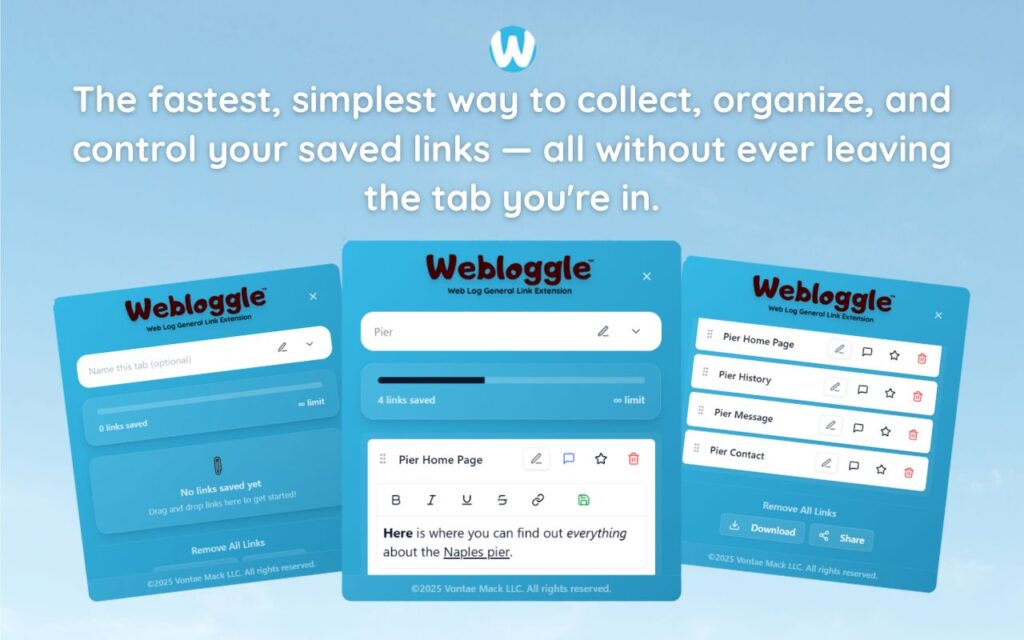
Collect In-tab Links
Drag and drop links into icon or box, right click to save.
-
Edit Link Titles
Name your links whatever you'd like.
-
Create Webloggle Bookmarks Folder
Click the star to create bookmarks of saved links.
-
Limited To The Main Tab Only
Upgrade to Webloggle Pro to use unlimited Tabs.
MOST POPULAR
Webloggle Pro offers you complete control over your tabs.
-
Collect In-tab Links
Drag and drop links into the icon, box, right click to save.
-
Edit Link Titles
Pro offers more robust link naming.
-
Create Webloggle Bookmarks Folder
Click the star to create bookmarks of saved links.
-
Add unlimited notes via WYSIWYG editor.
Bold, Underline, Italics, More Links? Webloggle Pro has you covered!
-
Name each tab individually
Name tab boxes anything you'd like.
-
Choose Tabs by Dropdown
Need to save a link in a different named Tab? With Webloggle Pro you can!
-
Download Your Saved Tabs To Your Computer - Links, Notes, Everything
Webloggle Pro sets your mind at ease with the ability to save all your necessary links, notes, etc to your own computer.
-
Share With Anyone!
Use the Share button in Webloggle Pro to embed your tab information practically anywhere!
Monthly Plan
Webloggle's Monthly Plan offers you complete control over your tabs.
-
Everything in the Yearly Plan is included.
This monthly plan offers everything available in the yearly plan.