
“When “All-In-One” Turns Into All-Over-the-Place”
Notion promises clarity.
In reality, it often delivers visual noise, mental overhead, and self-inflicted complexity.
You’ve seen it.
Pages inside pages.
Databases pretending to be documents.
Documents pretending to be dashboards.
Dashboards pretending to be productivity.
And somehow… a reminder to drink two bottles of water.
That’s not productivity.
That’s software micromanaging your existence.
Webloggle was built as a reaction to that.
The Core Difference
Notion tries to be your brain.
Webloggle respects that you already have one.
Notion wants you to:
Design systems
Maintain systems
Refactor systems
And constantly decide where things go
Webloggle does one thing exceptionally well:
Capture, preserve, and recall the things that matter while you’re already working.
No dashboards.
No templates.
No life-management cosplay.
Notion Is a Workspace
Webloggle Is a Memory Layer
Here’s the mistake most productivity tools make:
They assume your problem is organization.
Your real problem is loss.
Losing the article you meant to come back to
Losing the link that mattered at the moment
Losing context after closing a tab
Losing momentum because you had to “set something up”
Notion asks you to stop working and start organizing.
Webloggle works while you work.
The Clutter Problem (Let’s Be Honest)
Notion screenshots are a meme for a reason.
They’re dense.
They’re busy.
They’re performative.
Everything is visible all at once:
Sidebars
Toggles
Blocks
Icons
Nested hierarchies
Decorative structure masquerading as clarity
Even Notion power users admit it:
“It’s great… once you finish setting it up.”
Webloggle doesn’t need setup.
Because clarity shouldn’t require construction.
Why Webloggle Feels Instantly Better
Webloggle lives where your attention already is — the browser.
No app switching
No workspace context shift
No “where should this live?” anxiety
You:
See something important
Save it
It’s there when you need it again
That’s it.
No decision fatigue.
Notion Encourages Over-Documentation
Webloggle Encourages Continuity
Notion nudges you toward documenting everything:
Notes about notes
Systems about systems
Meta layers about productivity itself
Webloggle assumes something simpler:
You don’t need more structure.
You need fewer interruptions.
Webloggle captures:
Links
Pages
Context
Decisions in motion
Without asking you to narrate your life.
The Hidden Cost of Notion (Nobody Talks About This)
Notion doesn’t just cost time.
It costs mental energy.
Every interaction asks:
Is this a page or a database?
Should this be nested?
Should I template this?
Should I link this elsewhere?
Multiply that by hundreds of micro-decisions.
Webloggle removes those decisions entirely.
You don’t design Webloggle.
You use it.
Notion Is a Commitment
Webloggle Is a Relief
Notion feels like:
A second job
A digital filing cabinet you’re responsible for maintaining
A promise you made to your “more organized future self”
Webloggle feels like:
“Oh good, it’s saved.”
“I can come back to this later.”
“I don’t have to think about this right now.”
That difference matters.
Who Webloggle Is For (And Who It Isn’t)
Webloggle is perfect if you:
Work in tabs all day
Research, write, sell, build, or think online
Lose good links more often than you’d like
Hate maintaining systems
Value momentum over perfection
Webloggle is not trying to replace:
Project management tools
Personal journals
Life planners
Habit trackers
If you want software to remind you to drink water, Notion’s got you covered.
If you want to remember the things that actually move your work forward, that’s Webloggle.
A Quick Reality Check vs Trello
Trello is visual chaos with cards.
Notion is visual chaos with ambition.
Webloggle deliberately avoids becoming either.
Because the moment a tool starts demanding attention, it stops serving its purpose.
The Philosophy Behind Webloggle
Webloggle is built on a simple belief:
Your tools should get quieter as your work gets louder.
No dashboards screaming for attention.
No systems begging to be fed.
No guilt for not “keeping up.”
Just captured context — ready when you are.
Final Word
Notion sells the idea of control.
Webloggle delivers something better:
Confidence.
Confidence that what mattered won’t disappear.
Confidence that you don’t need to “organize later.”
Confidence that your work can stay fluid.
If Notion feels like clutter…
If Trello feels like noise…
If you just want your browser to remember things for you —
Webloggle was built for exactly that moment.
Try Webloggle Today
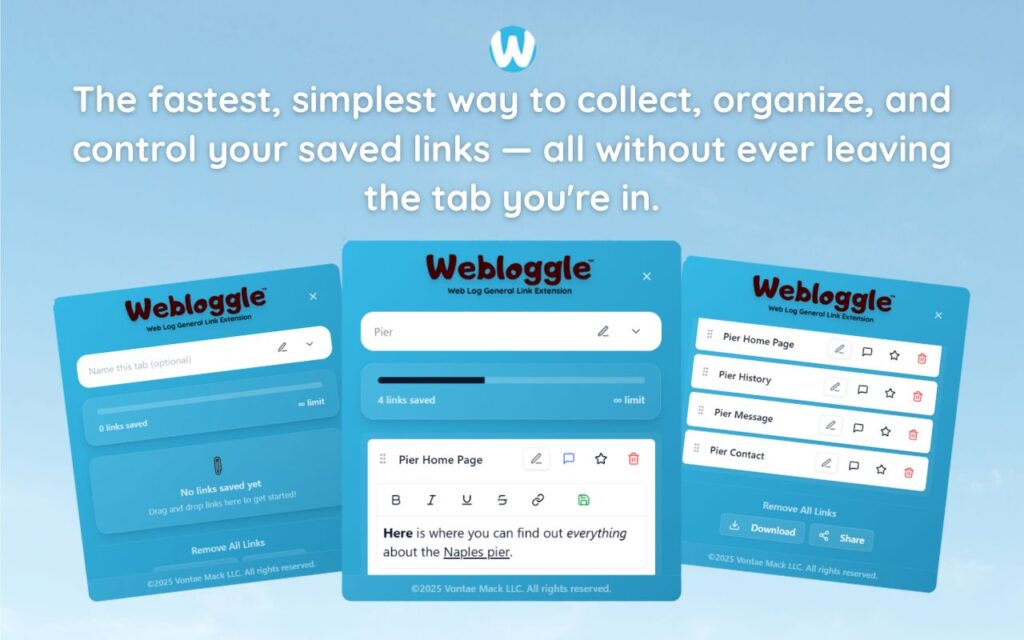
Free Version
Try Webloggle Free
-
Collect In-tab Links
Drag and drop links into icon or box, right click to save.
-
Edit Link Titles
Name your links whatever you'd like.
-
Create Webloggle Bookmarks Folder
Click the star to create bookmarks of saved links.
-
Limited To The Main Tab Only
Upgrade to Webloggle Pro to use unlimited Tabs.
MOST POPULAR
Webloggle Pro offers you complete control over your tabs.
-
Collect In-tab Links
Drag and drop links into the icon, box, right click to save.
-
Edit Link Titles
Pro offers more robust link naming.
-
Create Webloggle Bookmarks Folder
Click the star to create bookmarks of saved links.
-
Add unlimited notes via WYSIWYG editor.
Bold, Underline, Italics, More Links? Webloggle Pro has you covered!
-
Name each tab individually
Name tab boxes anything you'd like.
-
Choose Tabs by Dropdown
Need to save a link in a different named Tab? With Webloggle Pro you can!
-
Download Your Saved Tabs To Your Computer - Links, Notes, Everything
Webloggle Pro sets your mind at ease with the ability to save all your necessary links, notes, etc to your own computer.
-
Share With Anyone!
Use the Share button in Webloggle Pro to embed your tab information practically anywhere!
Monthly Plan
Webloggle's Monthly Plan offers you complete control over your tabs.
-
Everything in the Yearly Plan is included.
This monthly plan offers everything available in the yearly plan.