
Is It Research or Just Digital Hoarding? How to Know When to Save a Tab
You’re doing “research.”
At least, that’s what you tell yourself.
You’re reading an article. Then another. Then watching a video. Then comparing tools. Then cross-checking case studies from 2019. You have 14 tabs open, then 26, then 38. And somewhere in the middle of that mess, you whisper the word that makes it all feel justified:
“I’m researching.”
But here’s the thing:
Research uncaptured is research wasted.
There’s a fine line between curiosity and collection. Between preparation and procrastination. Between the pursuit of insight… and plain old digital hoarding.
The Lie of the Open Tab
Every tab tells a story. Or it wants to.
But when they’re all open at once – without names, without context, without place—those stories blur. And instead of moving forward, you orbit. You revisit. You skim. You forget why you cared.
You say you’re preparing.
But really, you’re delaying the decision.
You’re afraid to close the tab because you haven’t stored the meaning.
So it sits there.
And you sit there too.
Digital Hoarding Looks Productive. Until It Isn’t.
Hoarding is about fear. Fear of not having what you need. Fear of losing something valuable. Fear of missing out on “just in case.”
And it’s no different in the browser.
-
“I’ll read that later.”
-
“I might need that for the proposal.”
-
“That graph looked useful.”
But later doesn’t come. And need never arrives. And that graph? It’s now hidden in a tab titled Home.
You didn’t save a resource.
You created noise.
The Cure Isn’t Less Research. It’s More Intention.
Don’t stop being curious.
Don’t stop exploring.
But stop pretending that a tab left open is a decision made.
What matters isn’t how much you consume.
It’s what you capture.
That’s the moment of leverage – the moment when passive becomes active. When a wandering thought becomes a usable building block.
That moment?
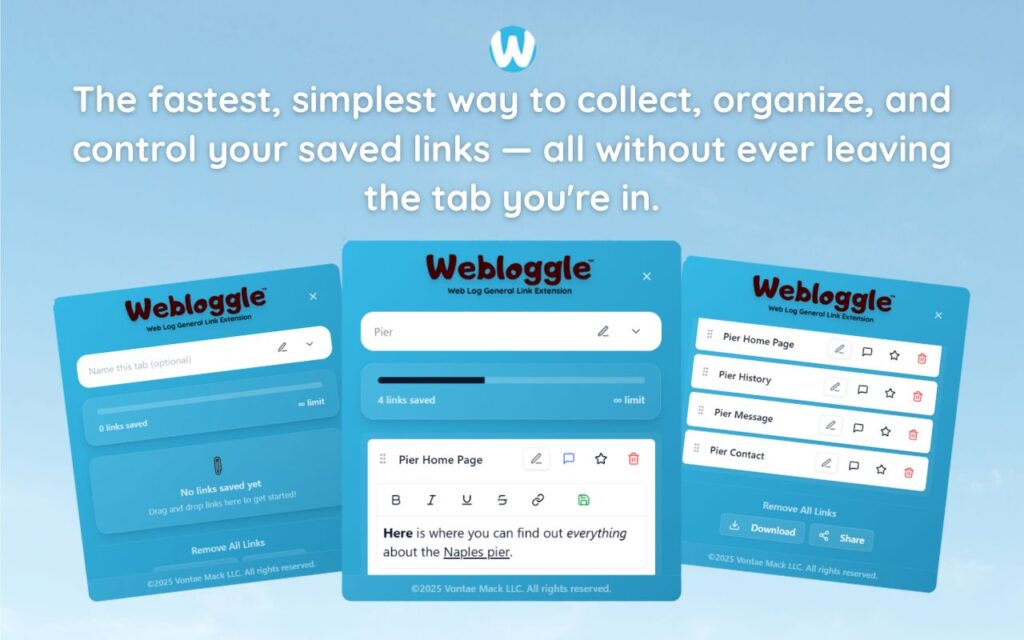
That’s where Webloggle lives.
Webloggle Doesn’t Judge Your Curiosity. It Organizes It.
You’re on a page that matters. Maybe not now – but soon.
You drag it to the icon.
You name it.
You label the why.
You drop it in a box.
You didn’t hoard it.
You filed it.
Now, when it’s time to act, it’s there. Waiting. Useful. Remembered.
That’s the difference between aimless collecting and purposeful research.
You Don’t Need Fewer Tabs. You Need More Decisions.
When do you save?
When the page matters.
When the idea has weight.
When you know your future self will thank you.
But you also close.
You finish.
You move forward.
Because naming a link is a signal.
It says: I saw this. I understood it. I know where it fits.
That’s not hoarding. That’s strategy.
So,
You don’t need to apologize for your curiosity.
But you do need to build a habit that captures the signal before it becomes noise.
That’s what Webloggle is.
Not a storage unit for forgotten links.
A clarity engine for the ideas that matter.
Because if it was worth opening…
…it’s worth saving with intention.
Free Version
Try Webloggle Free
-
Collect In-tab Links
Drag and drop links into icon or box, right click to save.
-
Edit Link Titles
Name your links whatever you'd like.
-
Create Webloggle Bookmarks Folder
Click the star to create bookmarks of saved links.
-
Limited To The Main Tab Only
Upgrade to Webloggle Pro to use unlimited Tabs.
MOST POPULAR
Webloggle Pro offers you complete control over your tabs.
-
Collect In-tab Links
Drag and drop links into the icon, box, right click to save.
-
Edit Link Titles
Pro offers more robust link naming.
-
Create Webloggle Bookmarks Folder
Click the star to create bookmarks of saved links.
-
Add unlimited notes via WYSIWYG editor.
Bold, Underline, Italics, More Links? Webloggle Pro has you covered!
-
Name each tab individually
Name tab boxes anything you'd like.
-
Choose Tabs by Dropdown
Need to save a link in a different named Tab? With Webloggle Pro you can!
-
Download Your Saved Tabs To Your Computer - Links, Notes, Everything
Webloggle Pro sets your mind at ease with the ability to save all your necessary links, notes, etc to your own computer.
-
Share With Anyone!
Use the Share button in Webloggle Pro to embed your tab information practically anywhere!
Monthly Plan
Webloggle's Monthly Plan offers you complete control over your tabs.
-
Everything in the Yearly Plan is included.
This monthly plan offers everything available in the yearly plan.
