
Tabs Are the New To-Do List (If You Use Them Right)
You ever notice how tabs are like a modern version of a to-do list?
Except worse.
They’re like a to-do list that screams at you while you’re trying to do the thing it reminded you to do.
I mean, when did we start thinking, “You know what would help me stay focused? Having 37 tiny windows open that each represent an unresolved task I’ve been avoiding for six days.” That’s not a system. That’s stress with a scroll bar.
Let me back up.
We used to have to-do lists. You remember those? A piece of paper. A pen. You’d write something down, feel the satisfaction of crossing it off. Maybe you even used one of those fancy little checkboxes if you were really living on the edge.
But now?
We use browser tabs.
Your to-do list is your browser.
Your agenda? It’s a row of tiny panic buttons.
And unlike paper, you can’t crumple up a tab.
You can’t toss it in the trash.
You can’t spill coffee on it and pretend it didn’t happen.
Nope.
That tab is there.
Waiting.
Judging.
Every time you open your laptop, it’s like, “Hey. Remember me? Yeah, I’m the product review you were gonna read before spending $800 on a new espresso machine you’ll never use. I’m still here. You’re welcome.”
A Tab for Every Thought, A Thought for Every Tab
Let’s be honest here.
Every tab is a thought you didn’t finish.
You saw something interesting. You clicked it. You read a little. You said, “Hmm. I should come back to this.”
You never came back.
Because another tab opened. Then another. Then the world kept turning, your calendar filled up, and before you knew it – your browser became a museum of abandoned ambition.
I’ve seen people with so many tabs open, their screen looks like a ticker tape machine had a baby with a ransom note.
It’s not browsing anymore. It’s emotional baggage with hyperlinks.
And yet, deep down, you believe in the tab.
You think, “I need this. This will help me.”
You tell yourself, “I’ll read this later.”
And “later” is always the last stop on the procrastination train.
What are we doing here, people?
The Myth of the Bookmark
Now, some of you think you’re better than the rest of us.
You say, “Oh no, I don’t leave tabs open. I bookmark.”
Really?
You bookmark?
Have you ever used a bookmark? I mean, seriously used one – as in, gone back, clicked it, remembered what it was, and did something meaningful with it?
Because let’s be honest: bookmarks are digital hoarding.
It’s the equivalent of someone saying, “No, I’m not messy. I just keep everything I’ve ever owned, touched, or glanced at in carefully labeled boxes stacked to the ceiling in my garage.”
And you ask them, “What’s in this box?”
They say, “Something important.”
“Why?”
“I don’t remember. But it felt important at the time.”
That’s your bookmarks folder. A cemetery of good intentions.
The Psychology of Tab Guilt
And don’t get me started on the guilt.
You close a tab and it feels like you’re letting go of a piece of your soul. “Noooo, I might need that!”
Really? You might need the list of “Top 87 Productivity Hacks for Creative Freelancers” from a blog that hasn’t posted since 2014?
You don’t need that.
What you need is closure.
Tabs stay open because we fear we’ll lose the value if we let them go.
But here’s the thing: tabs aren’t valuable unless they’re used.
And they’re not used unless they’re organized.
That’s where this starts to get interesting.
Because the solution? It’s not to close them all.
And it’s definitely not to keep them all open.
The solution is to turn them into a system that actually serves you.
Tabs = To-Do Items… If You Handle Them Right
Let’s make this simple.
A tab is just a task.
Not a full-blown project.
Not a philosophical inquiry.
Just a micro-task.
-
“Read this article”
-
“Watch this demo”
-
“Compare these prices”
-
“Find that quote again”
-
“Use this testimonial”
So what do we do with tasks?
We label them.
We prioritize them.
We group them.
And we check them off when we’re done.
But with tabs?
We just leave them sitting there like sad little puppies, looking up at us with “don’t forget me” eyes.
So what if we actually treated them like tasks?
What if every tab you opened got:
-
A name
-
A category
-
A next step
-
A home
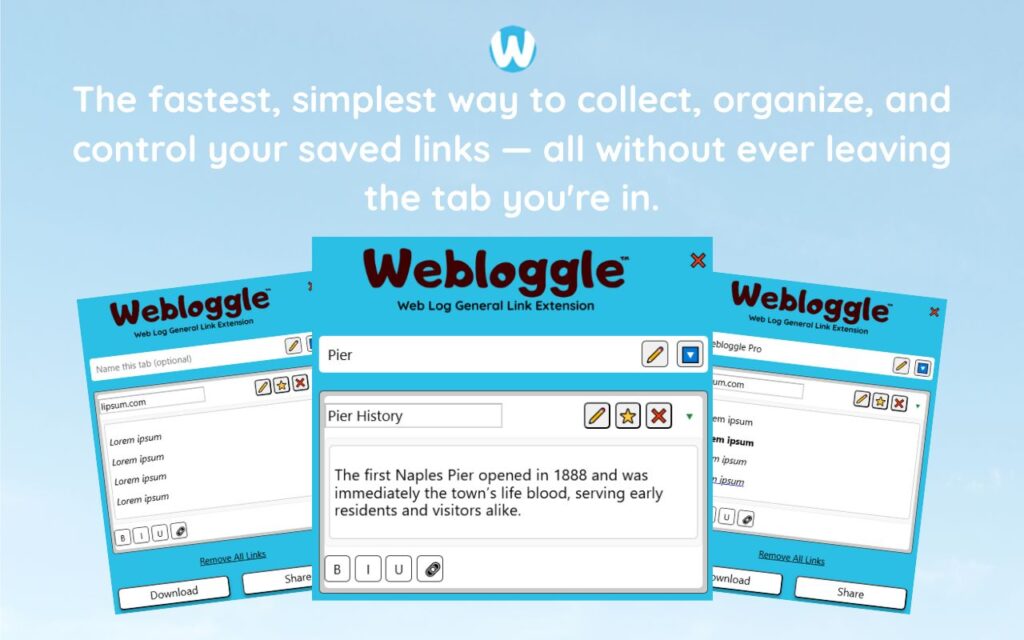
That’s what Webloggle does.
And yes, I know.
I sound like one of those people who joined CrossFit and now won’t shut up about it.
But hear me out.
Webloggle: A Fancy Name for “You’re Finally Organized”
Webloggle is the tool that says, “Hey, I see you trying to live your life one open tab at a time. That’s adorable. Let’s make that functional.”
It lets you take a tab and drag it to a little icon.
You label it.
You drop it into a box.
And boom – it’s no longer a tab.
It’s a thought with a name.
Suddenly, you’ve turned:
-
“Article I might read later”
into -
“Email Copy Hook for Client X – add to draft”
And that?
That’s productivity.
Because you didn’t just “save the tab.”
You gave it context.
You gave it meaning.
You gave it a chance.
Now, that tab is in a box called “Client X Email Assets.”
And when you go to write that email next week?
It’s waiting for you.
No guilt.
No re-Googling.
No “I know I saw this somewhere…”
Just structure.
Sweet, beautiful structure.
The Clean Tab Feeling
Let me tell you something nobody talks about.
Closing a tab with confidence is one of the greatest feelings on earth.
It’s right up there with fresh sheets.
Finding money in your jacket pocket.
Walking into a restaurant and being seated immediately.
But you only get that feeling when you know it’s been handled.
When you’ve saved it.
Labeled it.
Dropped it where it belongs.
Then you click the X and sigh.
Ahhhh. Progress.
It’s like exhaling a stress you didn’t know you were holding.
You do that enough times?
Your browser becomes less of a battlefield and more of a studio.
And now you’re creating.
You’re building.
You’re moving.
One tab at a time.
“But Jerry, I’m Not That Disorganized”
Sure. Okay.
You don’t think you have a problem.
You’ve got it “under control.”
Just like the person who says they don’t have a problem with caffeine – while holding a 64oz iced latte and twitching during a conference call.
Look, I’m not saying you’re a digital hoarder.
I’m just saying… if you’ve ever looked at your open tabs and felt anything between mild stress and an existential crisis?
You might benefit from a little browser feng shui.
And Webloggle?
It’s Marie Kondo for your browser.
But instead of asking, “Does this spark joy?”
It asks, “Does this spark action?”
If yes, save it with meaning.
If no, close the thing.
Final Word (Because I’ve Got Tabs to Close)
Tabs are the new to-do list.
That’s not a metaphor. That’s real.
You don’t need more tools.
You don’t need more cloud syncs, app integrations, or “brain extension” dashboards.
You just need a habit:
See value → Label it → Drop it → Close the tab.
And when you do?
You start browsing on purpose.
You start building ideas that compound.
You stop being the person with 47 open tabs and start being the person who actually does something with them.
That’s the shift.
That’s the joke.
And that’s the cure.
Now go.
Name your tabs.
Make your browser make sense.
And finally – finally – feel okay about closing the one that’s been open since 2021.
(Yeah, that one. You know which one I mean.)
Drag. Name. Drop. Close. Laugh. Repeat.
Welcome to the new to-do list.
And this time?
You’re actually going to do it.
Free Version
Try Webloggle Free
-
Collect In-tab Links
Drag and drop links into icon or box, right click to save.
-
Edit Link Titles
Name your links whatever you'd like.
-
Create Webloggle Bookmarks Folder
Click the star to create bookmarks of saved links.
-
Limited To The Main Tab Only
Upgrade to Webloggle Pro to use unlimited Tabs.
MOST POPULAR
Webloggle Pro offers you complete control over your tabs.
-
Collect In-tab Links
Drag and drop links into the icon, box, right click to save.
-
Edit Link Titles
Pro offers more robust link naming.
-
Create Webloggle Bookmarks Folder
Click the star to create bookmarks of saved links.
-
Add unlimited notes via WYSIWYG editor.
Bold, Underline, Italics, More Links? Webloggle Pro has you covered!
-
Name each tab individually
Name tab boxes anything you'd like.
-
Choose Tabs by Dropdown
Need to save a link in a different named Tab? With Webloggle Pro you can!
-
Download Your Saved Tabs To Your Computer - Links, Notes, Everything
Webloggle Pro sets your mind at ease with the ability to save all your necessary links, notes, etc to your own computer.
-
Share With Anyone!
Use the Share button in Webloggle Pro to embed your tab information practically anywhere!
Monthly Plan
Webloggle's Monthly Plan offers you complete control over your tabs.
-
Everything in the Yearly Plan is included.
This monthly plan offers everything available in the yearly plan.
