
I Used Webloggle for 30 Days Straight. Here’s How It Changed My Workflow Forever
I didn’t plan on making a change.
That’s how change usually starts – not with a strategy, but with a small moment of friction that finally becomes too much.
For me, it was a tab.
Number 37, to be exact.
I couldn’t remember what it was. I hovered over the icon. Waited for the tooltip. Clicked it. Waited for the page to load. Realized it was a reference I thought I needed, but couldn’t remember why.
Then I closed it.
And a quiet dread set in.
Because maybe it mattered.
Or maybe not.
But the problem was this: I had no way to know.
And that’s when I realized I didn’t need another productivity tool.
I needed a new relationship with the one place I spent most of my creative life: my browser.
So I installed Webloggle.
And for 30 days, I used it every single time a tab felt too valuable to close… and too vague to remember.
What happened surprised me.
Day 3: The Anxiety Dropped
This was the first shift. Quiet. Subtle.
I’d open something and think, “Oh, I want to come back to this.”
Normally, I’d leave the tab open.
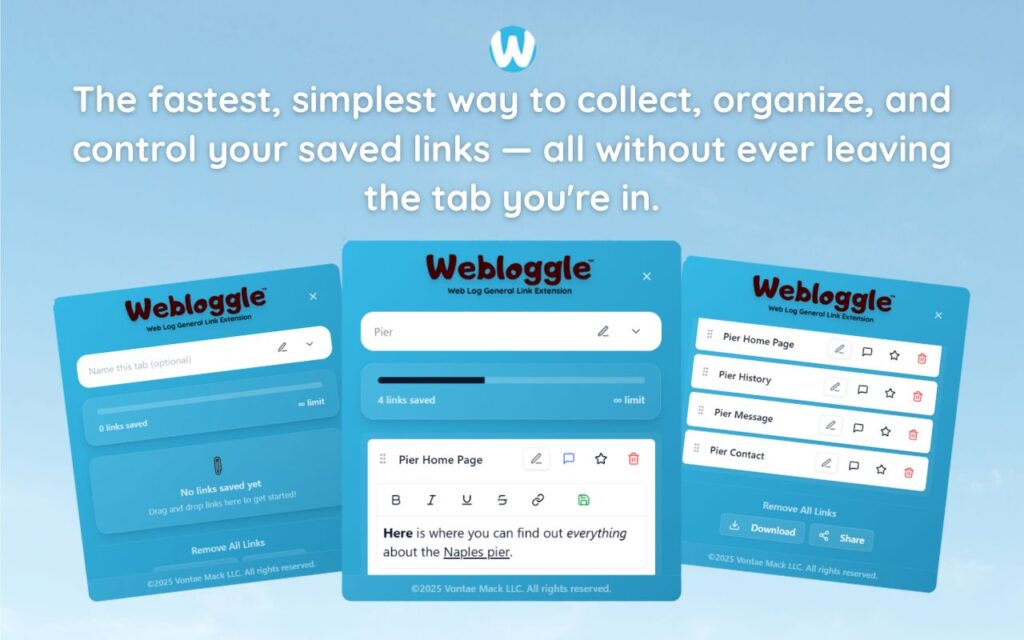
Now, I dragged it to the Webloggle icon, named it “Lead Gen – Example CTA copy,” and dropped it into a box.
I closed the tab.
And didn’t feel the usual twinge of risk.
That alone was worth it.
Day 7: My Brain Started Relaxing
The funny thing about clutter – mental or digital – is that you don’t realize how much it’s costing you until it’s gone.
By the end of the first week, I noticed something wild:
I wasn’t trying to remember everything.
That meeting I prepped for? All the links were already grouped in Webloggle under “Investor Prep.”
That article I found last week but didn’t finish? Saved in “To Read (Priority).”
I didn’t have to hold it all in my head.
My browser held it for me.
Not as tabs. As ideas.
Day 12: I Stopped Using Bookmarks
Bookmarks felt clumsy.
Too slow.
Too buried.
Too divorced from what I was actually doing.
With Webloggle, saving was part of the flow. Not an afterthought.
It took less time to name and file a link than it did to wonder where to store it.
So I stopped wondering.
And started organizing by instinct.
One drag. One name. One drop.
That was it.
Day 17: My Work Became Stackable
I didn’t realize how often I was repeating myself until I stopped.
Before, every new project started with a flurry of searches, re-discoveries, old email links, Slack threads, Google Docs.
Now?
I just opened a Webloggle box.
“Launch Email Sequences.”
“Competitor Screenshots.”
“UX Microcopy (SaaS).”
All the ingredients were already there – grouped, labeled, findable.
I wasn’t starting from zero.
I was stacking progress.
Day 22: My Tabs Cut Themselves in Half
Without trying, my tab count dropped.
Not because I was doing less.
But because I was holding onto more with less effort.
I could close tabs because they were already “caught.”
I could move between projects without worrying about losing momentum.
I wasn’t juggling links anymore.
I was flowing between organized pieces of thought.
Day 30: This Became a New Operating System
I didn’t install Webloggle to change everything.
I just wanted to stop losing tabs that mattered.
But 30 days later, the impact wasn’t about tabs.
It was about trust.
I now trusted my browser to remember what mattered.
And in turn, I trusted myself to let go.
That’s the moment you know a tool is more than a feature.
It’s a practice.
The Real Takeaway? It’s Not About the Tool. It’s About the Shift.
You don’t need to be more productive.
You need to stop leaking momentum.
Every open tab is a question:
“Will I need this later?”
“Is this important?”
“Where do I put it?”
Webloggle answers those questions with action:
-
Drag it.
-
Name it.
-
Drop it.
-
Close it.
-
Move on.
That’s not a shortcut. It’s a discipline.
It’s not a hack. It’s a standard.
And once you feel what it’s like to work without digital clutter whispering “don’t forget me” in the background, you never want to go back.
Final Word
I used Webloggle for 30 days straight.
Now I use it every day – without thinking.
Because that’s the mark of a great system.
It disappears into your behavior.
Not by demanding your attention.
But by giving it back to you.
That’s what this tool did for me.
And if you live in your browser?
It will do the same for you.
Free Version
Try Webloggle Free
-
Collect In-tab Links
Drag and drop links into icon or box, right click to save.
-
Edit Link Titles
Name your links whatever you'd like.
-
Create Webloggle Bookmarks Folder
Click the star to create bookmarks of saved links.
-
Limited To The Main Tab Only
Upgrade to Webloggle Pro to use unlimited Tabs.
MOST POPULAR
Webloggle Pro offers you complete control over your tabs.
-
Collect In-tab Links
Drag and drop links into the icon, box, right click to save.
-
Edit Link Titles
Pro offers more robust link naming.
-
Create Webloggle Bookmarks Folder
Click the star to create bookmarks of saved links.
-
Add unlimited notes via WYSIWYG editor.
Bold, Underline, Italics, More Links? Webloggle Pro has you covered!
-
Name each tab individually
Name tab boxes anything you'd like.
-
Choose Tabs by Dropdown
Need to save a link in a different named Tab? With Webloggle Pro you can!
-
Download Your Saved Tabs To Your Computer - Links, Notes, Everything
Webloggle Pro sets your mind at ease with the ability to save all your necessary links, notes, etc to your own computer.
-
Share With Anyone!
Use the Share button in Webloggle Pro to embed your tab information practically anywhere!
Monthly Plan
Webloggle's Monthly Plan offers you complete control over your tabs.
-
Everything in the Yearly Plan is included.
This monthly plan offers everything available in the yearly plan.
