
What Happens When You Treat Your Browser Like a Filing Cabinet
If your browser was a physical space, what would it look like?
For most people: a cluttered desk, papers stacked in teetering piles, sticky notes plastered everywhere, open books with no bookmarks, and half-finished folders spread across the floor.
You wouldn’t work like that in real life.
So why do we accept that chaos inside our browser?
It’s because we’ve never been taught to treat the browser like the central, structured workspace it truly is.
We treat it like a throwaway tool. A disposable tab machine. Something we’ll “get organized in” later.
But something changes – fast – when you treat your browser like a filing cabinet instead.
Let’s walk through what that looks like, and why it changes everything.
A Filing Cabinet Is Intentional
You don’t stuff papers into a filing cabinet at random.
You file them with a plan.
-
You label them.
-
You categorize them.
-
You keep what matters.
-
You toss what doesn’t.
-
You retrieve what you need – quickly.
This structure gives your workspace clarity, predictability, and momentum.
Your browser can offer that too.
But not if you’re relying on memory, tabs, and endless scrolling through history.
That’s like stuffing documents into drawers with no labels and hoping your future self remembers where they are.
Spoiler: it doesn’t.
The Tab Hoarding Habit (and Why It’s Hurting You)
You keep tabs open because they feel like “to-dos.”
That article you wanted to finish.
That product you’re still comparing.
That research you started.
That tool you want to try.
That client page you’re using today but might need again next week.
You don’t want to lose them, so you leave them open.
You feel like you’re “keeping track.”
But tabs are thin. They don’t carry context. They don’t explain themselves.
Leave them open too long and they become indistinguishable from one another – just icons and partial titles in a sea of rectangles.
It’s like pulling files out of a cabinet, leaving them on the floor, and wondering why you feel overwhelmed.
You’re not keeping track.
You’re building clutter.
The Filing Cabinet Mindset Shift
When you treat your browser like a filing cabinet, everything changes:
-
You don’t save tabs -you file them.
-
You don’t guess – you label.
-
You don’t reopen the same sites – you retrieve them.
-
You don’t fear closing a tab – you trust your system.
This is the difference between digital noise and digital flow.
It’s not about minimalism. It’s about control.
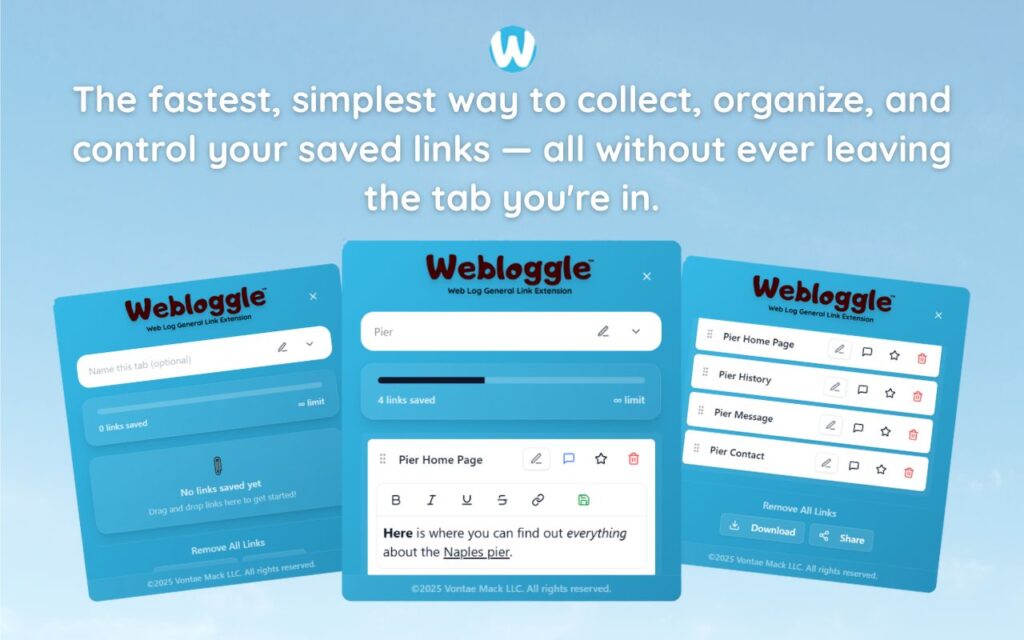
Webloggle: The Filing Cabinet Your Browser Never Had
Webloggle gives you what the browser never built in:
-
A way to save links with meaning
-
A way to group them by project, topic, or task
-
A way to name them in your own words
-
A way to reopen them with full context
Here’s how it works:
-
You see a link worth saving.
-
You drag it to the Webloggle icon.
-
You assign it to a “box” – a mini folder that reflects a real category in your mind.
-
You name the link.
-
You move on.
Later, everything you need is where you put it.
Filed. Labeled. Ready.
Just like a cabinet drawer with the right folder in the right spot.
Why This Works
-
You reduce mental load.
You stop trying to remember what every tab is for. -
You recover faster.
You don’t waste time trying to retrace your steps. -
You build continuity.
You can leave and return to a project without rebuilding your mental state. -
You get closure.
When a link is saved, named, and filed – you can close the tab with confidence. And that’s what lets you move on without anxiety.
What Happens When You Don’t File
You lose links.
You duplicate effort.
You re-search the same terms.
You forget what mattered.
You keep tabs open “just in case” and watch your browser become a junkyard of half-finished thoughts.
In short: you work harder than you need to.
It’s Not About Less. It’s About Access.
You don’t need to close every tab.
You don’t need to become a digital minimalist.
You just need to make sure that when something does matter – you can find it again.
And that’s where folders, bookmarks, and “read later” apps all fall short.
They don’t match the pace or pattern of real browsing.
Webloggle does.
It’s fast. It’s flexible. It’s built to live inside your flow – not on top of it.
Final Thought
If you had 100 paper files stacked in front of you with no labels, no folders, and no order – you’d stop everything and organize them.
You’d get a cabinet. A system.
You’d protect your work.
Your browser deserves the same respect.
Webloggle is the cabinet.
Your links are the files.
And the filing habit is the upgrade your brain’s been waiting for.
Treat your browser like a filing cabinet.
Because your work deserves to be remembered.
Free Version
Try Webloggle Free
-
Collect In-tab Links
Drag and drop links into icon or box, right click to save.
-
Edit Link Titles
Name your links whatever you'd like.
-
Create Webloggle Bookmarks Folder
Click the star to create bookmarks of saved links.
-
Limited To The Main Tab Only
Upgrade to Webloggle Pro to use unlimited Tabs.
MOST POPULAR
Webloggle Pro offers you complete control over your tabs.
-
Collect In-tab Links
Drag and drop links into the icon, box, right click to save.
-
Edit Link Titles
Pro offers more robust link naming.
-
Create Webloggle Bookmarks Folder
Click the star to create bookmarks of saved links.
-
Add unlimited notes via WYSIWYG editor.
Bold, Underline, Italics, More Links? Webloggle Pro has you covered!
-
Name each tab individually
Name tab boxes anything you'd like.
-
Choose Tabs by Dropdown
Need to save a link in a different named Tab? With Webloggle Pro you can!
-
Download Your Saved Tabs To Your Computer - Links, Notes, Everything
Webloggle Pro sets your mind at ease with the ability to save all your necessary links, notes, etc to your own computer.
-
Share With Anyone!
Use the Share button in Webloggle Pro to embed your tab information practically anywhere!
Monthly Plan
Webloggle's Monthly Plan offers you complete control over your tabs.
-
Everything in the Yearly Plan is included.
This monthly plan offers everything available in the yearly plan.
