
Tabs Are the New To-Do List (If You Use Them Right)
We all do it.
You open a tab, and in your mind, you’re saying: “This is something I need to do.”
Read this later.
Research this soon.
Respond to that eventually.
Buy this when you have time.
Come back here once you’ve finished everything else.
And so the tab stays open. Not because you’re using it – but because you’re afraid to forget it.
The tab becomes a task.
The task becomes a tab.
And suddenly, your browser isn’t a tool anymore – it’s a guilt machine.
This Is the Modern To-Do List
Except it’s invisible.
It’s unorganized.
And worst of all, it lies to you.
A traditional to-do list is honest. You can see what you’re avoiding. You can name what you’re postponing. You can cross things off.
But browser tabs?
They whisper promises.
They say, “You’re doing something.”
When really, you’re just keeping things in limbo.
We Used to Write Things Down. Now We Leave Them Open.
This isn’t a memory issue. It’s a trust issue.
We don’t trust that we’ll remember, so we let the browser remember for us.
But tabs don’t hold meaning.
They hold pages.
They don’t tell you why you saved them.
Or what matters.
Or when to return.
They just sit there – mute, stacked, and slowly draining your mental bandwidth.
You’re not working. You’re hovering.
What If Tabs Could Actually Work Like a To-Do List – Without the Guilt?
The real problem isn’t how many tabs you have.
It’s that they’re unmanaged.
They’re context-free.
They’re disconnected from intention.
Now imagine a simple shift.
Every time you open a tab you want to come back to, you drag it to a place – a real, structured place. You give it a name. You file it into a category that makes sense to you.
You’re not deleting it. You’re not forgetting it.
You’re capturing it.
Now it’s not just a page – it’s a task with a label, an idea with a home, a breadcrumb with purpose.
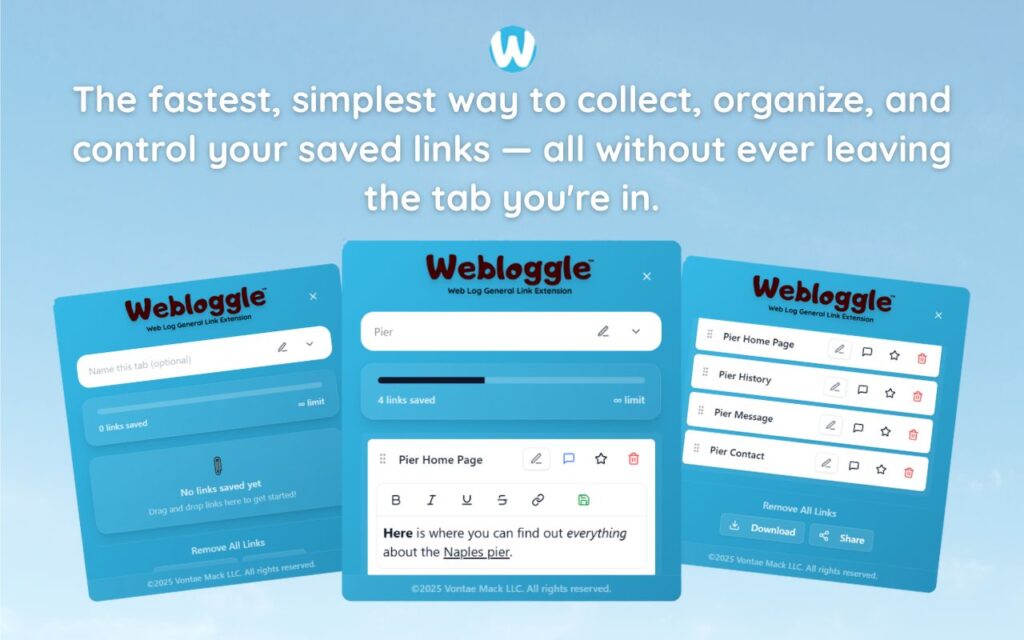
That’s what Webloggle gives you.
Webloggle Doesn’t Kill Tabs. It Transforms Them.
You open a tab because it matters.
Webloggle lets you close it without losing it.
That one habit – the moment where you drag, name, and save – flips your browser from a pile of maybes into a system of whens.
Each saved link becomes a decision made.
Each box becomes a working list.
Each label becomes a statement of clarity:
-
“Write about this next week.”
-
“Client resources for onboarding.”
-
“Ideas for pitch deck.”
-
“Tools to test post-launch.”
You’ve turned vague promises into actionable categories.
And your brain stops clinging.
Why This Works (Even Better Than a To-Do App)
Because it meets you in the moment.
You don’t have to switch platforms.
You don’t have to “organize” later.
You don’t need to schedule the task.
You catch it right when it matters – right inside your flow.
And suddenly, your browser isn’t a clutter trap.
It’s a creative assistant.
The Future of Focus Is in Your Tab Bar
Tabs aren’t going away.
But how we use them is up to us.
You can keep letting them pile up – pretending that one day, you’ll come back.
Or you can shift.
Turn tabs into tasks.
Tasks into categories.
Categories into progress.
One captured link at a time.
Final Word
Your to-do list isn’t in your notebook.
It’s in your browser.
The sooner you recognize that, the sooner you can stop pretending your tabs are temporary.
They’re not.
They’re breadcrumbs of your focus – if you have a system to follow them.
Webloggle doesn’t just give you that system.
It gives you permission to work with your brain – not against it.
Tabs are the new to-do list.
You just need a better way to write them down.
Free Version
Try Webloggle Free
-
Collect In-tab Links
Drag and drop links into icon or box, right click to save.
-
Edit Link Titles
Name your links whatever you'd like.
-
Create Webloggle Bookmarks Folder
Click the star to create bookmarks of saved links.
-
Limited To The Main Tab Only
Upgrade to Webloggle Pro to use unlimited Tabs.
MOST POPULAR
Webloggle Pro offers you complete control over your tabs.
-
Collect In-tab Links
Drag and drop links into the icon, box, right click to save.
-
Edit Link Titles
Pro offers more robust link naming.
-
Create Webloggle Bookmarks Folder
Click the star to create bookmarks of saved links.
-
Add unlimited notes via WYSIWYG editor.
Bold, Underline, Italics, More Links? Webloggle Pro has you covered!
-
Name each tab individually
Name tab boxes anything you'd like.
-
Choose Tabs by Dropdown
Need to save a link in a different named Tab? With Webloggle Pro you can!
-
Download Your Saved Tabs To Your Computer - Links, Notes, Everything
Webloggle Pro sets your mind at ease with the ability to save all your necessary links, notes, etc to your own computer.
-
Share With Anyone!
Use the Share button in Webloggle Pro to embed your tab information practically anywhere!
Monthly Plan
Webloggle's Monthly Plan offers you complete control over your tabs.
-
Everything in the Yearly Plan is included.
This monthly plan offers everything available in the yearly plan.
