
The Truth About “Productivity Tools” (And Why Most Just Waste Your Time)
It feels like every week there’s a new productivity tool being hyped.
Another app that promises to organize your life, optimize your day, gamify your goals, and automate everything short of brushing your teeth.
But after trying dozens – maybe hundreds – you’re still drowning in tabs, forgetting links, and losing track of what you were doing yesterday.
Why?
Because most productivity tools don’t solve your real problem.
They distract you from it.
The truth?
You don’t need more tools. You need fewer places to forget.
Let’s unpack what’s actually going on – and why the simplest shift, made right inside your browser, could be the only fix you’ve ever really needed.
The Productivity Tool Trap
Here’s the cycle:
-
You feel disorganized.
-
You download a new app.
-
You spend hours setting it up.
-
You feel productive just for having it.
-
You forget to use it two days later.
-
You move on to the next one.
Rinse. Repeat.
It’s productivity theater – full of dashboards and tags and boards and timers and widgets.
But here’s the catch:
They take more energy to maintain than they save.
You’re now managing the tool instead of your work.
You’re organizing the system instead of the thought.
And in the middle of it all?
Your browser is still overflowing with tabs.
The Real Work Happens in the Browser
Your ideas don’t begin in your to-do app.
They start in a tab.
That article you found.
That tool you’re considering.
That piece of research, inspiration, or reference material.
You open it because it matters.
You leave it open because you’re not done.
And you forget it because the browser was never built to hold the weight of your workflow.
Yet it’s where your work actually lives.
No app is going to save you if the place where your thinking happens is left unmanaged.
Most Tools Are Solving the Wrong Problem
They assume your issue is:
-
Prioritization
-
Scheduling
-
Task tracking
-
Project visibility
And those are all valid – if the work is already stored somewhere structured.
But what if your issue is that you can’t even find the link you needed?
What if you’re re-Googling the same thing four times a month?
What if you forgot why you kept that tab open in the first place?
That’s not a project management problem.
That’s a cognitive capture problem.
And most productivity tools don’t even acknowledge it.
Webloggle Solves the One Thing No One Else Does
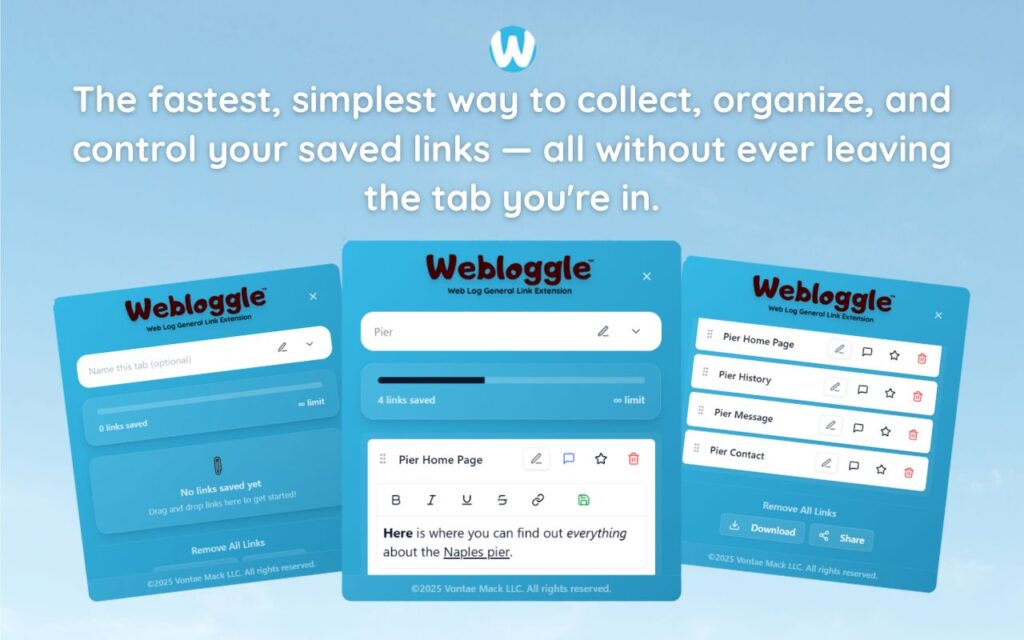
It meets you in the browser – before your ideas disappear.
When something matters:
-
You drag the tab to the icon.
-
You name the link in your own words.
-
You drop it into a box.
-
You close the tab without fear.
Later, when you’re ready, you open Webloggle.
And there it is.
Labeled. Organized. Waiting.
No more forgetting what mattered.
No more duplicate searches.
No more trying to “remember where you saw that thing.”
It’s all right there.
Why This Works When Other Tools Don’t
-
It’s frictionless.
No signup. No setup. No learning curve. Just drag, name, save. -
It works at the speed of thought.
You don’t need to “switch apps” or “go enter this somewhere.” It lives in your flow. -
It creates instant context.
When you name a link, you tell your future self why it mattered. -
It restores momentum.
You don’t waste 10 minutes trying to find something. You just click and go.
That’s what real productivity looks like.
Not bells. Not whistles. Just continuity.
Why “All-in-One” Usually Means All-Too-Much
When a tool tries to do everything, it often does nothing well.
And when you need to:
-
Save links
-
Track tasks
-
Take notes
-
Share projects
-
Automate workflows
…in one place, you end up with a bloated app that slows you down more than it speeds you up.
That’s the trap.
What you actually need is less.
Fewer steps. Fewer tools. Fewer distractions.
And a reliable, repeatable way to hold onto the stuff that matters.
That’s what Webloggle gives you.
How to Break Free from Tool Paralysis
Start here:
-
Close the apps you’re not using.
-
Open your browser.
-
Look at the tabs you’re afraid to close.
-
Ask: “Why did I keep this open?”
-
Save it in Webloggle.
-
Name it.
-
Let it go.
You didn’t lose the idea.
You captured it.
And now your mind is free to move.
Final Word
You don’t need another productivity tool.
You need a place to put things that actually matches the way you work.
Not another inbox.
Not another process.
Just one smart place to save what matters – right when it matters.
That’s Webloggle.
No clutter. No noise. No forgotten brilliance.
Just better thinking, made visible.
Free Version
Try Webloggle Free
-
Collect In-tab Links
Drag and drop links into icon or box, right click to save.
-
Edit Link Titles
Name your links whatever you'd like.
-
Create Webloggle Bookmarks Folder
Click the star to create bookmarks of saved links.
-
Limited To The Main Tab Only
Upgrade to Webloggle Pro to use unlimited Tabs.
MOST POPULAR
Webloggle Pro offers you complete control over your tabs.
-
Collect In-tab Links
Drag and drop links into the icon, box, right click to save.
-
Edit Link Titles
Pro offers more robust link naming.
-
Create Webloggle Bookmarks Folder
Click the star to create bookmarks of saved links.
-
Add unlimited notes via WYSIWYG editor.
Bold, Underline, Italics, More Links? Webloggle Pro has you covered!
-
Name each tab individually
Name tab boxes anything you'd like.
-
Choose Tabs by Dropdown
Need to save a link in a different named Tab? With Webloggle Pro you can!
-
Download Your Saved Tabs To Your Computer - Links, Notes, Everything
Webloggle Pro sets your mind at ease with the ability to save all your necessary links, notes, etc to your own computer.
-
Share With Anyone!
Use the Share button in Webloggle Pro to embed your tab information practically anywhere!
Monthly Plan
Webloggle's Monthly Plan offers you complete control over your tabs.
-
Everything in the Yearly Plan is included.
This monthly plan offers everything available in the yearly plan.
