
How the Smartest People You Know Manage Their Tabs Differently
You know the type.
They always seem calm, clear, ahead of schedule.
They have five projects going but never look frazzled.
While you’re fumbling through 20 tabs looking for that thing you swear you just saw, they’re already three steps ahead – grabbing the link, sharing the insight, and moving forward.
It’s not magic.
It’s not a better memory.
And it’s not because they don’t have as much going on.
It’s because the smartest people you know treat their browser differently.
They manage their tabs with intention.
And once you understand how, you’ll never go back to business as usual.
The Average User Lives in Reaction
Most people browse like they’re trying to catch butterflies.
They follow links. They open new tabs. They explore. They forget. They leave tabs open to remind themselves what mattered.
It works – until it doesn’t.
Until the browser becomes so overloaded that:
-
You don’t know what half the tabs are anymore
-
You’re afraid to close any of them
-
You’re reopening the same sites multiple times a week
-
You feel mentally stuck, even if you’re “working”
It’s not because you’re bad at organizing. It’s because the default browser setup is reactive.
You respond to what’s in front of you.
Smart people don’t operate like that.
They direct their browser, the same way they direct their day.
Smart People Don’t Rely on Memory
The best minds understand that memory is unreliable.
That’s why they externalize it.
When a page is important, they don’t just leave it open – they capture it.
Not as a generic bookmark.
Not as an unread tab buried behind Slack and Spotify.
They save it with context.
They name it.
They file it.
They make it retrievable.
They treat the browser as an extension of their working brain – not a series of unstructured impulses.
They Don’t Use Bookmarks Like a Crutch
Traditional bookmarks are passive. They assume you’ll remember what “Q1Strategy” or “Research/Stuff” means a month from now.
You won’t.
Smart users know this.
They’ve either moved beyond bookmarks – or they’ve evolved how they use them.
Instead of folders hidden three clicks deep, they use lightweight, visible systems that live where the work happens.
Where? In the browser.
Not in a separate app. Not in a different workflow. In the same space where the thought was born.
That’s the key.
They Use Tools That Match Their Flow
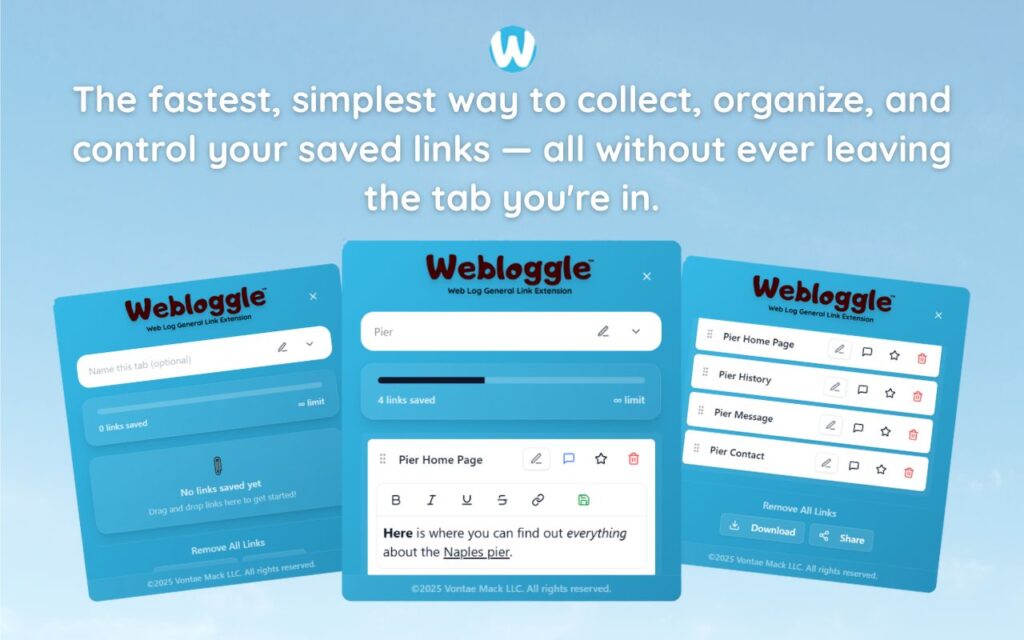
Enter Webloggle.
The smartest users use tools like this because it doesn’t try to change their behavior – it amplifies it.
When they come across something useful, they don’t trust their brain to hold onto it.
They drag it to the Webloggle icon.
They give it a short, meaningful name: “Pricing Comparison for Client,” “AI Tool to Test,” “Inspiration for Deck.”
They drop it into a box: “Client A Pitch,” “Q3 Strategy,” “Startup Ideas.”
Now it’s saved, named, and ready.
No clutter.
No confusion.
No open tabs needed.
Just clarity.
They Know the Cost of Switching
Smart people are obsessed with focus.
They know that every time they switch between apps, tabs, or projects without a structure, they pay a penalty.
They don’t want to lose 15 minutes hunting down that one article.
They don’t want to open 12 tabs just to remember where they left off.
So they build systems that reduce friction.
That’s why Webloggle works so well for them.
It’s not about storing everything – it’s about recovering the right thing at the right time.
And nothing’s faster than a named, labeled link sitting exactly where you left it.
They Name Everything for Future-You
This might sound trivial, but it’s profound.
The smartest users don’t save links for right now.
They save them for tomorrow – when their context will be gone.
So instead of relying on “Blog” or “Home” as a title, they rename it: “Conversion Tactics from SaaS Leader,” “Use for Slide 3 in Deck,” “Compare Against Competitor X.”
That’s the difference.
They’re not filing URLs.
They’re capturing thoughts.
And the moment you adopt that mindset, your browser stops being a mess—and starts being a toolkit.
They Close Tabs Without Fear
Because they trust their system.
They know that when they save a link in Webloggle, it’s done.
It’s not gone.
It’s just off their mind and ready for retrieval.
That one change – closing tabs with confidence – is what separates them from the rest.
You can spot these people a mile away.
They’re not stressed. They’re not juggling. They’re not asking “Where did I see that again?”
They just move.
Smoothly. Intentionally. Forward.
You Can Work Like That, Too
You don’t need to be a genius.
You don’t need to start from scratch.
You don’t need to overhaul your workflow.
You just need to start managing tabs like they matter.
Because they do.
They’re not distractions.
They’re not clutter.
They’re fragments of your focus.
And when you save them smartly, name them properly, and revisit them intentionally – you start working like the smartest person you know.
Final Word
The smartest people aren’t trying to remember everything.
They’re building systems that let them forget – without losing a thing.
You can start doing that today.
With Webloggle.
One tab at a time. One box at a time. One step ahead, always.
Free Version
Try Webloggle Free
-
Collect In-tab Links
Drag and drop links into icon or box, right click to save.
-
Edit Link Titles
Name your links whatever you'd like.
-
Create Webloggle Bookmarks Folder
Click the star to create bookmarks of saved links.
-
Limited To The Main Tab Only
Upgrade to Webloggle Pro to use unlimited Tabs.
MOST POPULAR
Webloggle Pro offers you complete control over your tabs.
-
Collect In-tab Links
Drag and drop links into the icon, box, right click to save.
-
Edit Link Titles
Pro offers more robust link naming.
-
Create Webloggle Bookmarks Folder
Click the star to create bookmarks of saved links.
-
Add unlimited notes via WYSIWYG editor.
Bold, Underline, Italics, More Links? Webloggle Pro has you covered!
-
Name each tab individually
Name tab boxes anything you'd like.
-
Choose Tabs by Dropdown
Need to save a link in a different named Tab? With Webloggle Pro you can!
-
Download Your Saved Tabs To Your Computer - Links, Notes, Everything
Webloggle Pro sets your mind at ease with the ability to save all your necessary links, notes, etc to your own computer.
-
Share With Anyone!
Use the Share button in Webloggle Pro to embed your tab information practically anywhere!
Monthly Plan
Webloggle's Monthly Plan offers you complete control over your tabs.
-
Everything in the Yearly Plan is included.
This monthly plan offers everything available in the yearly plan.
