The Psychology of Tab Overload — and the Unexpected Cure
You don’t leave 27 tabs open because you’re lazy.
You do it because your brain is trying to protect something.
An idea.
A task.
A reference.
A moment you don’t want to lose.
Every open tab is a mental placeholder – proof that you had a thought worth keeping.
But when those placeholders start stacking up, your browser turns into a battlefield, and your brain goes from managing your work to managing where your work even is.
This isn’t just bad digital hygiene.
It’s a drain on your cognitive energy.
It’s a source of low-level stress.
It’s a completely unintentional behavior driven by the same psychology that governs hoarding, memory formation, and fear of loss.
And until you understand why you’re doing it, you can’t stop.
Let’s unpack what’s really going on – and how to stop drowning in tabs without losing what matters.
The Hidden Drivers Behind Tab Overload
-
Fear of forgetting
You keep a tab open because closing it feels like closing a door you might need to reopen. Your brain flags it as “unfinished,” and you physically can’t let it go without some kind of capture system. -
Fear of effort
Saving something “properly” often feels like more work than just leaving it open. “I’ll deal with it later” becomes your default. -
Fear of lost insight
That one article had a line you loved. That tutorial had a step you don’t want to lose. That tab represents more than content – it holds value. -
Cognitive offloading
We use tabs as a stand-in for memory. “As long as it’s open, I won’t forget it.” But tabs aren’t memory – they’re friction. -
Perceived productivity
A full browser makes us feel busy. Like we’re in the middle of a lot. That illusion of momentum masks the reality: you’re stalling.
What Tab Overload Really Costs You
-
Mental fatigue from visual clutter
-
Context switching delays every time you jump around
-
Decision fatigue from constantly re-evaluating which tab to click
-
Rework because you forgot, lost, or duplicated your own efforts
-
Avoidance because you don’t even want to open your browser and face it all
You think you’re staying productive.
But what you’re really doing is preserving friction.
The very thing you’re trying to avoid – losing good work – is exactly what happens when you rely on open tabs to remember it all.
The Cure Isn’t to Close Everything
That advice doesn’t work.
Because it ignores the why behind the behavior.
Your brain doesn’t want fewer tabs – it wants trust.
It wants to know that if it lets go, the idea isn’t gone.
It wants a place to put things that matters just as much as the tab did.
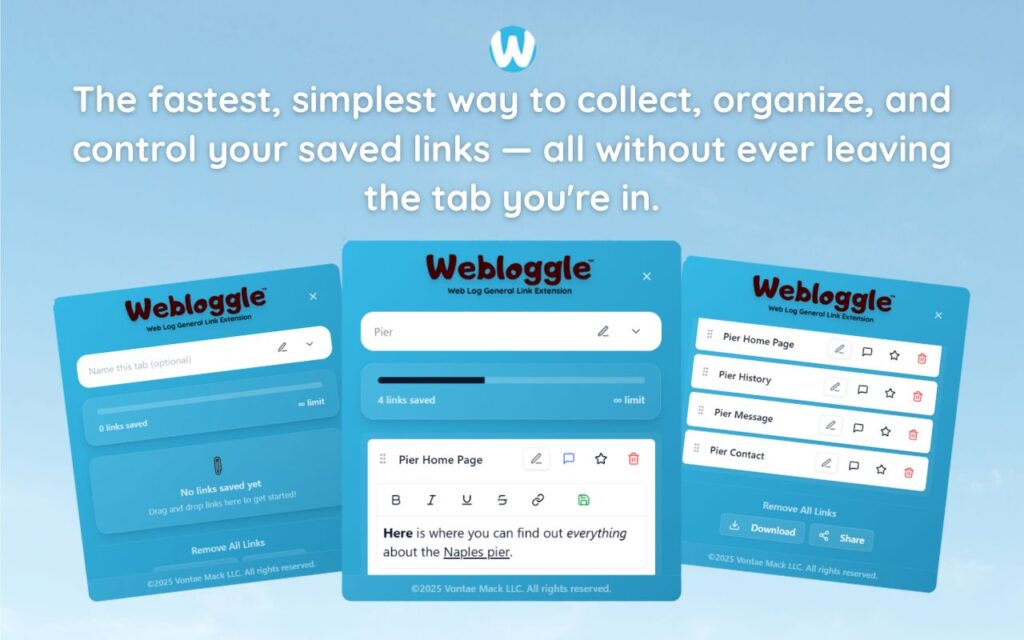
That’s where Webloggle enters the picture.
Webloggle: Designed to Calm the Chaos
Webloggle isn’t just a tab saver.
It’s a psychological release valve.
It says: “Hey, you don’t have to hold this anymore. We’ve got it.”
When you drag a link to the Webloggle icon:
-
You’re telling your brain, “This is safe now.”
-
You’re naming what it means, so you’ll know later.
-
You’re assigning it to a box, so it’s retrievable.
-
You’re releasing the mental tension of an unclosed loop.
It’s not about decluttering.
It’s about relieving pressure.
Why Naming Is the Key
When you name a saved link, you transform it from a vague tab into a meaningful unit of thought.
“Blog” becomes “Use this for Q2 pitch.”
“Pricing” becomes “Compare vs. Competitor B.”
Now when you return, you don’t just see a link.
You see intention.
And that’s what your brain really needed all along: a thread back to the moment you cared.
Tab Overload Is a Symptom of a System Failure
Not your failure.
A system failure.
You were never given the tools to work at the speed you think.
So you adapted.
You left things open. You relied on memory. You tolerated clutter.
But now, there’s a better way.
A system that:
-
Captures on the fly
-
Labels with meaning
-
Groups by purpose
-
Lives inside your existing workflow
No new apps. No logins. No load time.
Just a better way to think.
The Mental Shift That Changes Everything
When you stop thinking, “I don’t want to lose this,” and start thinking, “I know exactly where I put this,” the game changes.
You go from tab hoarder to focused operator.
From digital anxiety to digital confidence.
From mental drag to mental flow.
And all it takes is one habit:
Capture, name, close, return.
That’s it.
That’s the loop.
And Webloggle is how you make it effortless.
Final Word
Your tab overload doesn’t mean you’re disorganized.
It means you’re trying to hold onto what matters – without the right tool to do it.
Webloggle fixes that.
It doesn’t tell you to stop saving things.
It gives you a better way to save yourself from the chaos.
Close the tab.
Keep the thought.
Clear the space.
Let your brain breathe again.
Free Version
Try Webloggle Free
-
Collect In-tab Links
Drag and drop links into icon or box, right click to save.
-
Edit Link Titles
Name your links whatever you'd like.
-
Create Webloggle Bookmarks Folder
Click the star to create bookmarks of saved links.
-
Limited To The Main Tab Only
Upgrade to Webloggle Pro to use unlimited Tabs.
MOST POPULAR
Webloggle Pro offers you complete control over your tabs.
-
Collect In-tab Links
Drag and drop links into the icon, box, right click to save.
-
Edit Link Titles
Pro offers more robust link naming.
-
Create Webloggle Bookmarks Folder
Click the star to create bookmarks of saved links.
-
Add unlimited notes via WYSIWYG editor.
Bold, Underline, Italics, More Links? Webloggle Pro has you covered!
-
Name each tab individually
Name tab boxes anything you'd like.
-
Choose Tabs by Dropdown
Need to save a link in a different named Tab? With Webloggle Pro you can!
-
Download Your Saved Tabs To Your Computer - Links, Notes, Everything
Webloggle Pro sets your mind at ease with the ability to save all your necessary links, notes, etc to your own computer.
-
Share With Anyone!
Use the Share button in Webloggle Pro to embed your tab information practically anywhere!
Monthly Plan
Webloggle's Monthly Plan offers you complete control over your tabs.
-
Everything in the Yearly Plan is included.
This monthly plan offers everything available in the yearly plan.
