Forget the Cloud. The Real Magic Is Right Inside Your Browser
We’ve been told to put everything in the cloud.
Our notes.
Our files.
Our photos.
Our plans.
Our systems.
And sure – it’s powerful. The cloud lets us access anything from anywhere. It connects devices. It backs up data. It automates collaboration.
But somewhere along the way, we forgot something:
The browser is already the cloud.
It’s the interface.
It’s the launchpad.
It’s where your ideas, research, communication, and execution all begin.
So why do we treat it like a temporary window instead of what it truly is – the single most important digital environment in our daily life?
Because the browser has always been great at showing things.
But it’s been terrible at holding them.
Until now.
The Forgotten Power of the Browser
You open your browser every day without thinking.
You don’t just visit websites.
You live in them.
-
Your email is there.
-
Your documents are there.
-
Your research, your dashboards, your writing tools, your spreadsheets.
The browser is no longer a tool for finding information.
It’s a tool for working with it.
So here’s the question: If the browser is where everything happens, why isn’t it where everything is saved?
Why are we still relying on bookmarks, to-do apps, and cloud sync tools to remember what mattered?
Why are we trusting our attention to a pile of tabs we hope we won’t forget to revisit?
The truth is, we don’t need to outsource our memory to more apps.
We just need to unlock the potential of the tool we already use the most.
The Cloud Isn’t the Fix If the Entry Point Is Broken
Every cloud-based productivity tool still depends on the moment you choose to use it.
But what happens in between?
What about that moment you found a perfect article while reading another?
What about that half-read report you had to close before a meeting?
What about the sixth tab you opened in a research sprint and meant to come back to?
Most of your digital “lost work” never had a chance to make it into the cloud.
It got lost in the browser.
That’s where the breakdown happens.
And that’s where the fix needs to begin.
Webloggle: The Cloud-Like Memory Layer Your Browser Was Missing
Webloggle doesn’t replace your cloud tools.
It strengthens the moment before them.
It’s the quick-draw capture method you wish you’d had all along.
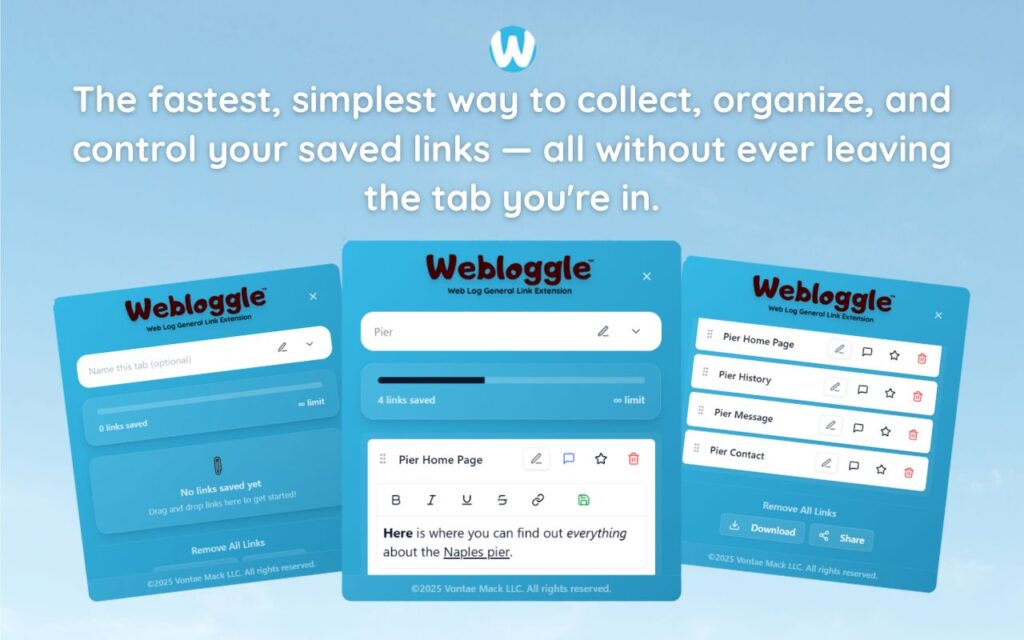
See a link worth saving?
→ Drag it to the icon.
→ Name it in your own words.
→ Drop it into a labeled box.
→ Close the tab with confidence.
The next time you need it, it’s there.
No sync needed. No login. No third-party app.
Just your browser, doing something it’s never been able to do before:
Hold your thoughts with clarity.
The Real Magic Isn’t in Storage. It’s in Retrieval.
Anyone can save something.
But can you find it later?
Can you remember what it was for?
Can you pick up where you left off – without re-Googling, re-reading, re-thinking?
The browser’s default tools – history, bookmarks, tab groups – fail because they focus on storage, not recall.
Webloggle changes that.
It makes naming part of the flow.
So instead of a list of URLs, you have a system of labeled ideas.
That’s what makes it different.
And that’s why it feels like the cloud – but better.
You’re Already Cloud-Connected. Now You Can Be Thought-Connected.
Think about how often your best work happens like this:
-
You’re researching something new.
-
You find multiple resources.
-
You jump between tools.
-
You want to keep the good stuff – but don’t have time to stop and organize.
That’s the moment where most productivity systems fall apart.
Because they require you to break flow to stay organized.
Webloggle doesn’t.
It lives inside your browser, exactly where you’re already thinking.
And it works at the speed of a thought you don’t want to lose.
The Browser Was Always the Right Place – We Just Used It Wrong
It’s not that your tabs are the problem.
It’s that they were never meant to be storage units.
They were meant to be paths.
Webloggle transforms those paths into intentional trails.
It gives you a map of your thinking – one box at a time.
No syncing. No cloud login. No workflow overhaul.
Just drag, name, and move on.
And when you come back?
There it is.
Saved. Contextual. Ready.
The Difference Between “Find Again” and “Lost Forever” Is 3 Seconds
That’s all it takes.
-
See something important.
-
Drag to Webloggle.
-
Name it.
-
Keep working.
Later, when someone says, “Where’d you read that stat?” or “Did you ever find that tool?” – you don’t shrug and dig.
You open the box and click.
And that’s the quiet magic of owning your browser again.
Final Word
We’ve been taught that everything needs to live in the cloud.
But the thing we use most – our browser – has been neglected.
Webloggle doesn’t compete with the cloud.
It completes the browser.
Because memory doesn’t happen in storage.
It happens in naming, context, and return.
And now, finally, your browser can do that too.
Free Version
Try Webloggle Free
-
Collect In-tab Links
Drag and drop links into icon or box, right click to save.
-
Edit Link Titles
Name your links whatever you'd like.
-
Create Webloggle Bookmarks Folder
Click the star to create bookmarks of saved links.
-
Limited To The Main Tab Only
Upgrade to Webloggle Pro to use unlimited Tabs.
MOST POPULAR
Webloggle Pro offers you complete control over your tabs.
-
Collect In-tab Links
Drag and drop links into the icon, box, right click to save.
-
Edit Link Titles
Pro offers more robust link naming.
-
Create Webloggle Bookmarks Folder
Click the star to create bookmarks of saved links.
-
Add unlimited notes via WYSIWYG editor.
Bold, Underline, Italics, More Links? Webloggle Pro has you covered!
-
Name each tab individually
Name tab boxes anything you'd like.
-
Choose Tabs by Dropdown
Need to save a link in a different named Tab? With Webloggle Pro you can!
-
Download Your Saved Tabs To Your Computer - Links, Notes, Everything
Webloggle Pro sets your mind at ease with the ability to save all your necessary links, notes, etc to your own computer.
-
Share With Anyone!
Use the Share button in Webloggle Pro to embed your tab information practically anywhere!
Monthly Plan
Webloggle's Monthly Plan offers you complete control over your tabs.
-
Everything in the Yearly Plan is included.
This monthly plan offers everything available in the yearly plan.
