
This One Change Turned My Browser Into a Productivity Machine
Darling, let me just say this: I used to treat my browser like a purse I hadn’t cleaned out since 1998.
You know what I mean.
Receipts, expired coupons, a Tic Tac from another dimension – and somewhere in there, probably a Chanel sample that could legally be declared hazardous.
That was my Chrome window.
It wasn’t a workspace. It wasn’t even a workspace impersonator. It was a digital handbag full of nonsense – tabs on tabs on tabs, like a circus act without the makeup.
And the worst part?
I thought I was being productive.
I really did.
I’d look at all my open tabs like, “Look at me, I’m doing so much!”
Spoiler: I wasn’t doing a thing.
Let me be honest – my tab count was higher than my blood pressure on a bad day.
Some days it was 40. Others, 75. I once hit 103 tabs and told myself, “I must be a genius.” No, Joan, you’re just one crash away from a nervous breakdown.
But that’s the trap, right?
We confuse clutter with progress.
And that’s what I want to talk about.
Because I made one change – just one – and my entire browser became a machine. I’m telling you. It was like I went from driving a golf cart with three wheels to a German-engineered productivity spaceship.
So what was the change?
I stopped saving tabs.
And I started saving the reason behind them.
You want to change your life?
Change the way you treat tabs.
Tabs are not treasures. They’re reminders. And if you don’t label the reminder, you’ll forget why it mattered in the first place.
It’s like leaving yourself a note that just says “milk” – and then later wondering if that meant buy milk, drink milk, or avoid dairy altogether.
Tabs without context? Useless.
I had 12 tabs open for “writing inspiration,” and not one of them inspired anything except self-loathing.
So here’s what I did:
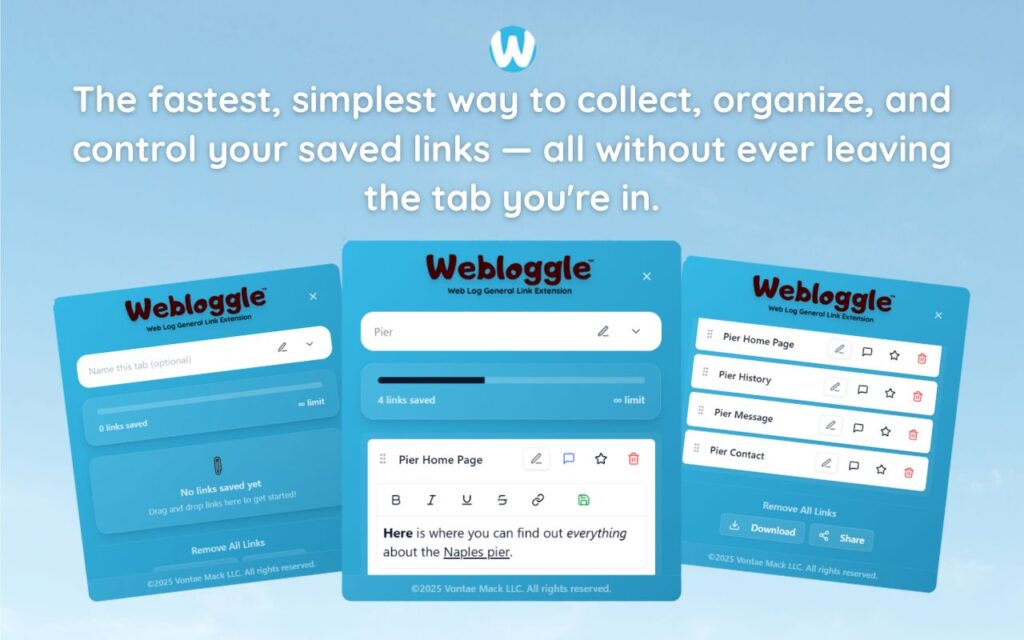
I found this little extension called Webloggle.
Now listen – it’s not trying to be cute. It’s not trying to be trendy. It’s not out here wearing pastel icons and trying to give you a dopamine hit every time you check something off.
It’s a grown-up tool for people who want to actually get things done.
You drag a tab to it, and it asks you the magic question:
“Why are you saving this?”
And I nearly cried.
Because for the first time, I wasn’t hoarding tabs – I was capturing thoughts.
Here’s what it looked like for me.
Instead of keeping 12 tabs open for a pitch, I saved them all to Webloggle, and wrote notes like:
“Use this quote in Slide 6 – sets the tone.”
“Open with this story – emotional hook, not cheesy.”
“Client mentioned this competitor – reference casually.”
Then I closed the tabs.
Did you hear that?
I. Closed. The. Tabs.
And I didn’t panic.
Because I knew the thoughts were safe. Not saved – safe.
They had context. They had direction. They had meaning.
And when I came back? I didn’t have to re-read every page like I had browser-based amnesia.
I just read my notes, opened the best ones, and executed.
Now let me tell you what happens when you do this.
Your brain stops spinning.
You stop carrying a hundred half-formed ideas around like a mental purse full of uncapped pens.
You sit down to work and you’re not sorting, searching, scrolling – you’re starting.
And the relief?
Oh my stars, the relief.
It’s like going from running on a treadmill to running on a track. One moves. The other moves forward.
This one change – this shift from “save tab” to “save why” – did more for my productivity than any planner, app, or color-coded calendar ever did.
Because I finally respected my own attention.
I stopped pretending I’d remember.
I stopped lying to myself with bookmarks I never looked at.
I stopped hoarding ideas like they were going out of style.
And I started writing myself a little note – just one sentence – that said:
“Hey future me, this is what you meant to do with this.”
That’s the difference between clutter and clarity.
One is just “stuff.”
The other is stuff with a purpose.
And that, my darling, is when your browser becomes a machine.
Not a mess. Not a mystery. Not a Monday morning regret.
A machine.
Every tab serves a job.
Every folder holds progress.
Every note guides your next move.
It’s not flashy.
But it works.
Now look, I’m not perfect. I still get messy.
I still fall back into the old ways sometimes.
But now I’ve got a system. A soft place to land. A net under the trapeze act of my brain.
And that’s what Webloggle gave me.
Not productivity tips. Not a motivation boost.
A place for my thoughts to go.
So they don’t drown me when I come back to them.
Final thought?
You don’t need to do everything.
You just need to stop forgetting why you started.
You don’t need fewer tabs.
You need fewer unknowns.
You need clarity.
And it starts with one little change:
Before you open that tab?
Ask yourself: Will I remember what this is for?
If the answer is no?
Then drag it, name it, save it.
Close it.
And get back to being the unstoppable force you were born to be.
Because darling?
Mess is cute in a handbag.
Not in your browser.
Free Version
Try Webloggle Free
-
Collect In-tab Links
Drag and drop links into icon or box, right click to save.
-
Edit Link Titles
Name your links whatever you'd like.
-
Create Webloggle Bookmarks Folder
Click the star to create bookmarks of saved links.
-
Limited To The Main Tab Only
Upgrade to Webloggle Pro to use unlimited Tabs.
MOST POPULAR
Webloggle Pro offers you complete control over your tabs.
-
Collect In-tab Links
Drag and drop links into the icon, box, right click to save.
-
Edit Link Titles
Pro offers more robust link naming.
-
Create Webloggle Bookmarks Folder
Click the star to create bookmarks of saved links.
-
Add unlimited notes via WYSIWYG editor.
Bold, Underline, Italics, More Links? Webloggle Pro has you covered!
-
Name each tab individually
Name tab boxes anything you'd like.
-
Choose Tabs by Dropdown
Need to save a link in a different named Tab? With Webloggle Pro you can!
-
Download Your Saved Tabs To Your Computer - Links, Notes, Everything
Webloggle Pro sets your mind at ease with the ability to save all your necessary links, notes, etc to your own computer.
-
Share With Anyone!
Use the Share button in Webloggle Pro to embed your tab information practically anywhere!
Monthly Plan
Webloggle's Monthly Plan offers you complete control over your tabs.
-
Everything in the Yearly Plan is included.
This monthly plan offers everything available in the yearly plan.
