
Most People Use Chrome Like a Notepad. I Use It Like a Dashboard.
I used to use Chrome like a notebook.
Not even a good notebook.
Not the leather-bound kind you see on desks in movies where people have beautiful handwriting and deep, clear thoughts.
No.
More like one of those yellow legal pads you spill coffee on, scribble in half-asleep, and keep flipping the page thinking maybe the next one will make sense.
That’s how I used Chrome.
Tab after tab.
Thought after thought.
Each one opened in a moment of hope.
And each one left behind in a trail of mental clutter.
And I told myself it was fine.
“This is just how I work.”
But it wasn’t work.
It was noise.
People say the browser is just a tool.
But I don’t think that’s true.
Your browser is your environment.
It’s your command center.
Your battlefield.
Your lab.
Your therapist’s office.
Your dumping ground.
Your browser is where you process the world.
And most of us?
We treat it like a paper napkin.
We scribble ideas onto it and hope it doesn’t disintegrate before we come back.
And when it does, we act surprised.
I’ve had ideas die in my browser.
Not dramatic, poetic deaths.
Quiet deaths.
Like this:
I’d open a tab. A great article.
Skim it. Think, “Wow, that’s useful.”
Leave it open.
Go to another meeting.
Forget about it.
Come back a day later.
Can’t remember what I was thinking.
Close it.
Gone.
That happened hundreds of times.
Maybe thousands.
It’s hard to know what you’ve lost when you can’t even remember it was yours.
That’s what most people are doing with Chrome.
They’re not browsing.
They’re not building.
They’re leaking ideas.
They’re trying to hold onto too many things with no container.
No clarity.
No system.
They’re writing mental notes on pages that blow away in the wind.
But then I changed one thing.
And that changed everything.
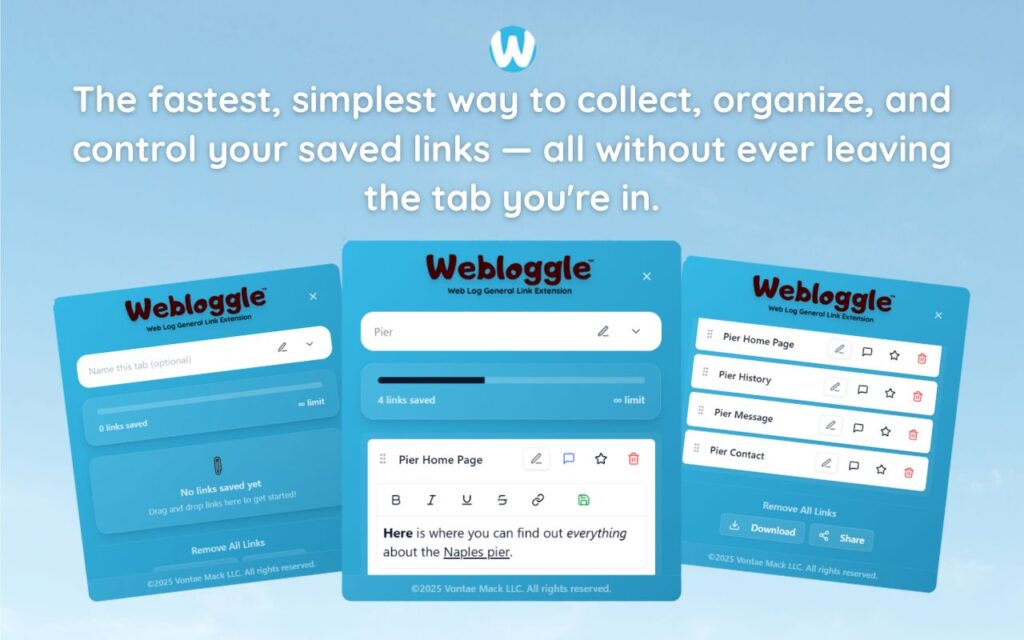
It’s called Webloggle.
I didn’t find it in some big “Top 10 Productivity Tools” list.
I wasn’t looking for it.
It was just… there.
A friend sent it to me.
“Try this. You need it,” they said.
Which, if you know me, is exactly the kind of thing I ignore. I hate being told what I need.
But I opened it anyway.
It looked simple.
Too simple.
Drag a tab.
Add a note.
Drop it into a folder.
Close the tab.
That’s it.
No gamification.
No widgets.
No settings menu that looks like a NASA dashboard.
Just… a place to name your thoughts.
The first thing I Webloggled was a pricing page for a SaaS tool I kind of wanted to copy.
Don’t judge.
I dragged it to the icon.
Typed:
“Use this pricing layout for new funnel. Clean. Anchors well.”
Dropped it in a folder I called “Pricing Inspiration.”
Closed the tab.
For the first time in weeks, I didn’t feel like I was throwing the idea into a black hole.
It felt contained.
And that feeling?
It’s addictive.
I started using Webloggle every day.
Whenever I opened something that triggered a thought – not just curiosity, but action – I’d drag it, label it, drop it, and close it.
That became my rhythm.
It’s not sexy.
It’s not a 4-hour workweek.
It’s just:
-
I read something.
-
I say why it matters.
-
I save that reason.
-
I don’t keep it open as a crutch.
And suddenly…
My browser wasn’t a notebook anymore.
It was a dashboard.
Here’s the difference:
A notebook holds everything – whether it’s useful or not.
A dashboard shows what you need, when you need it, clearly.
Webloggle made that possible.
Because every time I open a project now?
I open a folder in Webloggle.
-
“Client Z – Launch Quotes”
-
“Email Copy – Strong CTAs”
-
“Design Elements – Hero Layouts”
-
“Stats to Use in Talks”
Each one has 5, maybe 10 links.
Each one is labeled with the exact reason I saved it.
I’m not guessing anymore.
I’m not searching.
I’m not thinking, “Wait, wasn’t there a page I liked about this?”
I know where it is.
That’s a dashboard.
This is why most people are stuck.
They’re treating the most powerful tool on their computer like a random pile of sticky notes.
They open, save, hoard, forget, reopen, panic, and repeat.
And they blame themselves.
They say:
“I just need to focus more.”
No.
You don’t need more focus.
You need fewer open thoughts.
You need a path back to what matters.
That’s it.
Webloggle didn’t make me a productivity wizard.
It didn’t fix all my bad habits.
But it gave me a way to stop losing thoughts the second I had them.
And that alone?
That changed everything.
I still see people treat their browsers like scratchpads.
Opening tabs like they’re playing roulette.
“I might need this.”
“I’ll come back to it.”
“This seems important.”
It’s not sustainable.
You wouldn’t build a company on sticky notes.
You wouldn’t run a surgery using Post-its.
So why are you trying to manage your ideas – the most valuable thing you have – with tabs you don’t even name?
A dashboard tells you what to do.
Webloggle made my browser do that.
Because now?
When I sit down to write, pitch, plan, build – whatever?
I’m not starting from a pile of noise.
I’m starting from a box of intentions I already wrote for myself.
Each link is a tool.
Each note is a breadcrumb back to the moment I cared.
That’s not organization.
That’s rescue.
Final thought:
You can keep using Chrome like a notebook.
Scribble. Forget. Repeat.
But if you want to actually move forward – with less guilt, more clarity, and a browser that doesn’t feel like a weight on your chest?
Try Webloggle.
Use it like a dashboard.
-
Drag
-
Name
-
Drop
-
Close
And get your thoughts – and your life – back.
Because your ideas deserve more than an open tab and a promise to come back “someday.”
They deserve a system.
And that system lives one click away.
Free Version
Try Webloggle Free
-
Collect In-tab Links
Drag and drop links into icon or box, right click to save.
-
Edit Link Titles
Name your links whatever you'd like.
-
Create Webloggle Bookmarks Folder
Click the star to create bookmarks of saved links.
-
Limited To The Main Tab Only
Upgrade to Webloggle Pro to use unlimited Tabs.
MOST POPULAR
Webloggle Pro offers you complete control over your tabs.
-
Collect In-tab Links
Drag and drop links into the icon, box, right click to save.
-
Edit Link Titles
Pro offers more robust link naming.
-
Create Webloggle Bookmarks Folder
Click the star to create bookmarks of saved links.
-
Add unlimited notes via WYSIWYG editor.
Bold, Underline, Italics, More Links? Webloggle Pro has you covered!
-
Name each tab individually
Name tab boxes anything you'd like.
-
Choose Tabs by Dropdown
Need to save a link in a different named Tab? With Webloggle Pro you can!
-
Download Your Saved Tabs To Your Computer - Links, Notes, Everything
Webloggle Pro sets your mind at ease with the ability to save all your necessary links, notes, etc to your own computer.
-
Share With Anyone!
Use the Share button in Webloggle Pro to embed your tab information practically anywhere!
Monthly Plan
Webloggle's Monthly Plan offers you complete control over your tabs.
-
Everything in the Yearly Plan is included.
This monthly plan offers everything available in the yearly plan.
