What People Really Mean When They Say “I Saw That Somewhere”
You’ve said it.
I’ve said it.
We all say it.
“I saw that somewhere.”
It’s the most harmless, casual phrase in the world.
But it’s a lie.
A soft, innocent, socially acceptable lie.
Because when you say “I saw that somewhere,” what you really mean is:
“I had an idea. I didn’t save it. I lost it. And now I’m pretending it doesn’t matter.”
The brain doesn’t forget everything.
It forgets just enough to mess with you.
You remember seeing it.
You remember feeling something when you saw it.
But you don’t remember what it was, where it was, or what you were supposed to do with it.
So you shrug.
You move on.
You open another tab.
Repeat.
“I saw that somewhere” is the mental equivalent of waking up with a dream you can’t quite remember — just the outline, the emotional residue.
And in that moment?
You’ve lost more than just a link.
You’ve lost an opportunity to act.
A pitch that could’ve landed.
A headline that could’ve hit.
A strategy that could’ve worked.
A quote that could’ve closed the deal.
It doesn’t sound dramatic.
But when it happens every day?
It compounds.
And eventually?
You stop trusting yourself.
Here’s the pattern I noticed in my own life:
-
I’d be reading something brilliant.
-
I’d think, “I should save this.”
-
But I didn’t want to break flow.
-
So I kept reading.
-
Then I opened another link.
-
Then I had a meeting.
-
Then I forgot why I opened it in the first place.
Three days later, I’d be writing a newsletter and think:
“There was something great I read about this… somewhere.”
Somewhere.
That’s the graveyard.
The internet is full of brilliant thoughts we’ve half-consumed.
But brilliance without retrieval is just noise.
And when your system for remembering is, “leave the tab open and hope,” you’ve already lost.
I know because I did it for years.
I had tabs opened for months.
Some were literally articles I had already read — twice — but forgot both times why I cared.
And I’d say to myself:
“It’s fine. I’ll come back to it.”
Then I’d say:
“I saw that somewhere.”
That’s what made Webloggle different.
It didn’t promise to organize my life.
It didn’t optimize my attention span.
It didn’t pretend I was broken and needed to be fixed.
It just asked me to stop lying.
To admit, “This matters, and here’s why.”
Right now.
While the thought is still hot.
Before it fades into somewhere.
Here’s how it works:
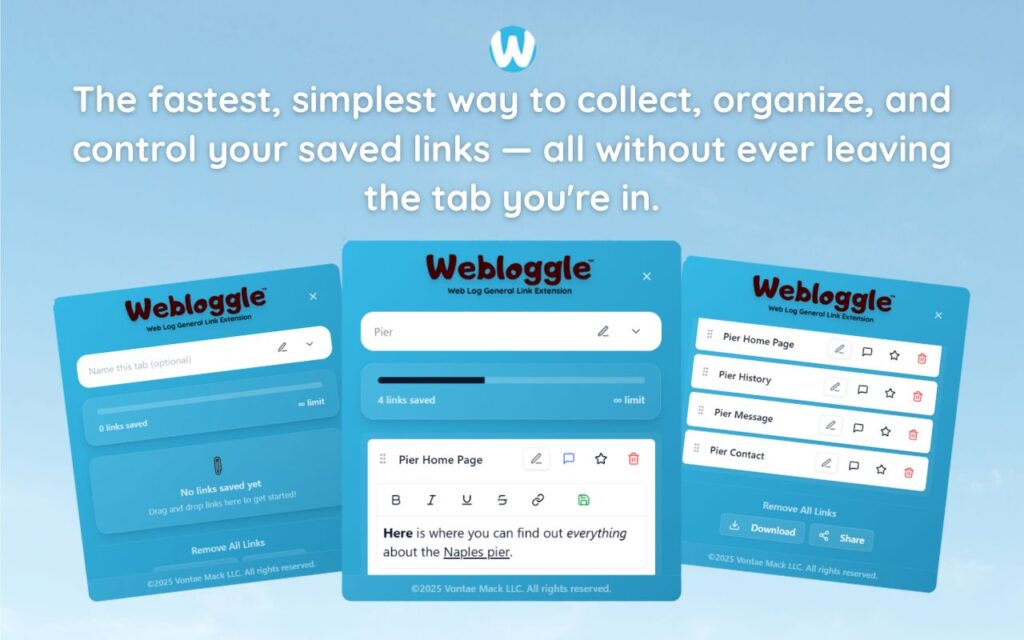
→ You’re on a page. Something clicks.
→ You drag it to the Webloggle icon.
→ It prompts a simple question: “What is this for?”
→ You type a sentence:
“Mention this analogy in the burnout episode – minute 14.”
“Steal this framework for slide 2 in workshop.”
“Stat to open sales call – dramatic and recent.”
→ You drop it into a folder.
→ You close the tab.
And just like that?
You’ve prevented a somewhere from ever happening.
Now, when I think, “I saw that quote,”
I don’t guess.
I open Webloggle.
I search “quote.”
There it is – with my note attached.
The page.
The paragraph.
The intent.
And suddenly?
I’m not guessing anymore.
I’m retrieving.
Which is the difference between hoping and actually doing.
Let me be blunt.
Most of us are losing 70% of our creative capacity to “I saw that somewhere.”
Not because we’re lazy.
Not because we’re unmotivated.
Because we don’t have a habit for anchoring the moment when it matters most.
That moment when your brain lights up.
When you see the structure, the phrase, the pattern – the “yes, this.”
But you’re too distracted, too rushed, too optimistic.
You think you’ll remember.
You won’t.
Unless you name it.
And that’s what Webloggle does:
It asks you to name the moment.
That’s all.
Not catalog it.
Not summarize it.
Just label it – with intent.
And once you do that?
You don’t forget.
Even if you never come back, you’ve already saved the thinking, not just the link.
Here’s an example from last week.
I was building a proposal for a client.
Usually, I’d spend half a day combing through tabs trying to remember what I saw that “might be useful.”
But I opened Webloggle.
Folder: “Client Z – Language & Phrasing”
There it was:
“Reframe this as a transformation, not a feature. Use the format from this case study.”
I clicked the link.
The exact paragraph I needed.
The one I would’ve forgotten.
The one that anchored the pitch.
It saved me four hours.
But more than that?
It saved me from the shame spiral of “Why can’t I ever find anything when I need it?”
You think you’re building systems.
But really, you’re building trust.
Between now-you and future-you.
Webloggle is that bridge.
It says:
“Don’t worry. You don’t have to carry this in your head.
Just tell me why it matters. I’ll remember it for you.”
And you believe it.
Because it works.
“I saw that somewhere” becomes:
“I saved that here.”
And that?
That’s how you go from noise to action.
From overload to clarity.
From intention to execution.
Final thought:
We all swim in information.
But the winners?
They’re not the ones who consume the most.
They’re the ones who return to what mattered.
So next time you hear yourself say:
“I saw that somewhere…”
Stop.
Ask yourself:
“Why didn’t I save it with intent?”
Then make a new habit.
Drag.
Name.
Drop.
Close.
Because somewhere is nowhere.
But here – in Webloggle – is where ideas wait patiently to be used.
Free Version
Try Webloggle Free
-
Collect In-tab Links
Drag and drop links into icon or box, right click to save.
-
Edit Link Titles
Name your links whatever you'd like.
-
Create Webloggle Bookmarks Folder
Click the star to create bookmarks of saved links.
-
Limited To The Main Tab Only
Upgrade to Webloggle Pro to use unlimited Tabs.
MOST POPULAR
Webloggle Pro offers you complete control over your tabs.
-
Collect In-tab Links
Drag and drop links into the icon, box, right click to save.
-
Edit Link Titles
Pro offers more robust link naming.
-
Create Webloggle Bookmarks Folder
Click the star to create bookmarks of saved links.
-
Add unlimited notes via WYSIWYG editor.
Bold, Underline, Italics, More Links? Webloggle Pro has you covered!
-
Name each tab individually
Name tab boxes anything you'd like.
-
Choose Tabs by Dropdown
Need to save a link in a different named Tab? With Webloggle Pro you can!
-
Download Your Saved Tabs To Your Computer - Links, Notes, Everything
Webloggle Pro sets your mind at ease with the ability to save all your necessary links, notes, etc to your own computer.
-
Share With Anyone!
Use the Share button in Webloggle Pro to embed your tab information practically anywhere!
Monthly Plan
Webloggle's Monthly Plan offers you complete control over your tabs.
-
Everything in the Yearly Plan is included.
This monthly plan offers everything available in the yearly plan.
