
Your Browser Is a Pile of Notes with No Labels — Fix That
Okay, let’s get something straight.
Your browser? It’s not a workspace. It’s not a to-do list. It’s not even a productivity hub.
It’s a junk drawer.
And I love you, but somebody has to say it.
Your browser is a pile of unlabeled notes you’ve been collecting for weeks, maybe months, and probably in some cases… since the Obama administration.
You know what it reminds me of? That one kitchen drawer everyone has. You know the one. Batteries. Rubber bands. A birthday candle. One single paperclip from 2004. You tell yourself it’s organized because it “has a drawer.” Please.
Let’s take a look at what you’re calling “organization” in Chrome right now.
You’ve got 27 open tabs.
Two are playing audio and you don’t know from where.
One is a Google Doc you started and never titled – “Untitled document” like it’s some mystery novel.
Four are blog posts you meant to read.
Three are product pages with coupons you forgot to apply.
And at least six are things you definitely opened on purpose but can’t, for the life of you, remember why.
This isn’t multitasking. This is digital amnesia.
You are not working. You are wandering.
You are digitally loitering.
And don’t say it’s “just how your brain works.” If that were true, your brain would’ve filed for eviction by now.
Let me tell you something about notes without labels: they’re useless.
You wouldn’t scribble “thing I like” on a Post-it and hand it to your assistant and say, “Here, build my keynote speech around this.”
So why are you doing that to yourself?
Why are you collecting tabs like pressed flowers in a book with no pages?
It’s not romantic. It’s not creative. It’s not even functional.
It’s just mess.
Let’s call this what it is: you are hoarding ideas, and just like with physical clutter, that hoarding is taking a toll.
You’re tired.
You’re overwhelmed.
You’re busy – so busy! – but never seem to move the needle.
Do you know why?
Because every time you sit down to work, your brain has to do an archaeological dig to remember what that article, that quote, that stat even meant.
You can’t build momentum when you’re always starting at square one.
So what do we do?
We label.
We give our thoughts – even our messiest, most half-baked, mid-scroll discoveries – a home and a purpose.
And we do it immediately.
That’s the secret. That’s what the pros do.
You don’t wait until “later” to organize your thoughts. “Later” is a lie. Later means “never.”
You do it now, while the idea is still warm.
This is where my beloved Webloggle comes in.
And no, it’s not glamorous.
It doesn’t sparkle.
It doesn’t throw confetti in your face when you close a tab.
It’s not trying to make you feel like a productivity god.
It’s doing something better: it’s keeping you sane.
Let me walk you through it.
You open a page. You love it. It’s got a quote, a layout, a stat – something that makes your brain light up.
You used to just leave it open forever like a squatter waiting for inspiration.
Not anymore.
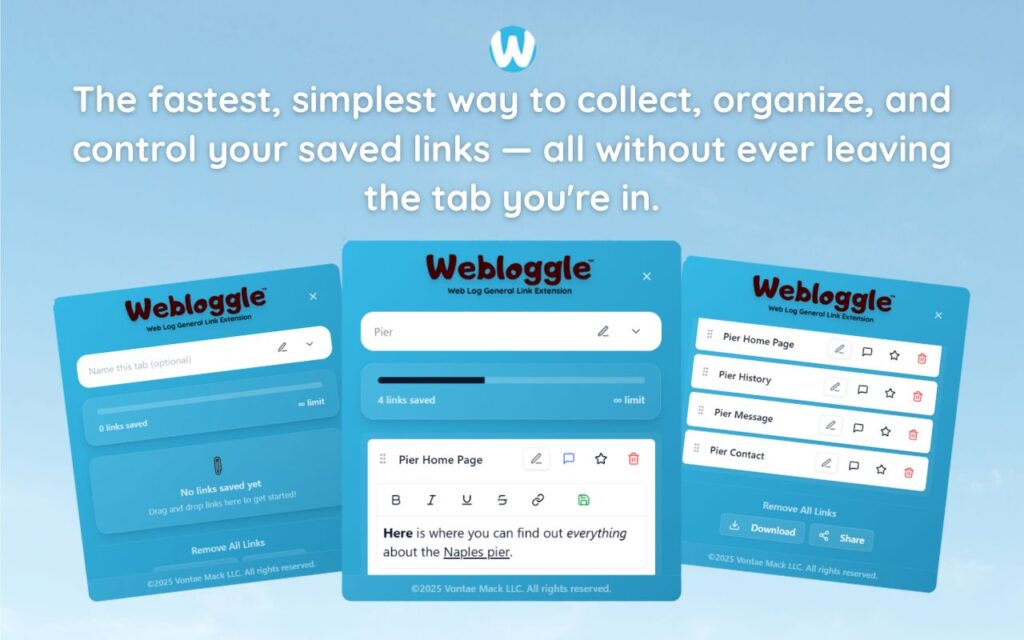
Now, you drag the tab to the Webloggle icon.
A little box pops up – simple, clean, no nonsense – and it asks you:
“Why are you saving this?”
Let me pause right there, because that question alone is a miracle.
Not what is it.
Why.
That’s the question your entire browser has been begging you to answer.
And once you do?
“Mention this quote in Slide 2 – client loves data.”
“Steal this layout for homepage redesign.”
“Emotional tone – use this for onboarding email draft.”
Then you save it in a folder. Not a black hole. A real folder.
-
“Client Deck – Stats”
-
“Inspiration – Email Openers”
-
“Homepage Redesign – Swipe Files”
And THEN?
You close the tab.
Because it’s safe. Because it’s named. Because it’s no longer another anonymous tab in the witness protection program.
You want to feel productive?
Stop pretending your browser can hold your memory for you.
It can’t.
Your brain is not a filing cabinet. It’s a creative machine – but only when it’s not drowning in clutter.
You’ve got tabs open that could’ve been closed a month ago if you’d just labeled them properly.
You’ve got articles you’ll never find again.
You’ve got “resources” you can’t remember why you saved.
And it’s all slowing you down.
But when you start naming?
When you start labeling?
When you start treating your browser like the professional dashboard it’s supposed to be?
That’s when things change.
That’s when you stop asking, “Where did I see that thing?” and start saying, “I’ve got the perfect quote for this – it’s in my Webloggle folder.”
That’s when you stop clicking through 20 tabs hoping one of them rings a bell.
That’s when you start building – with speed, with clarity, and dare I say it, with style.
And don’t think this is just about being organized.
It’s about respecting your own ideas.
You didn’t click that tab by accident.
You clicked it because something in it mattered.
So give it a name.
Treat it like something worth keeping – not just remembering vaguely three weeks from now when you’re squinting at your screen thinking, “Why is this open again?”
Final thought?
Your browser is full of notes right now.
Thoughts. Sparks. Ideas.
And without labels?
They’re dust.
But with Webloggle? With five seconds and a little intention?
They become building blocks.
Pieces of real work.
Fragments of clarity you can return to.
So stop hoarding, start labeling, and for heaven’s sake – don’t let your best ideas drown in a sea of unnamed tabs.
Give them a name.
Give them a folder.
Give them a chance.
Free Version
Try Webloggle Free
-
Collect In-tab Links
Drag and drop links into icon or box, right click to save.
-
Edit Link Titles
Name your links whatever you'd like.
-
Create Webloggle Bookmarks Folder
Click the star to create bookmarks of saved links.
-
Limited To The Main Tab Only
Upgrade to Webloggle Pro to use unlimited Tabs.
MOST POPULAR
Webloggle Pro offers you complete control over your tabs.
-
Collect In-tab Links
Drag and drop links into the icon, box, right click to save.
-
Edit Link Titles
Pro offers more robust link naming.
-
Create Webloggle Bookmarks Folder
Click the star to create bookmarks of saved links.
-
Add unlimited notes via WYSIWYG editor.
Bold, Underline, Italics, More Links? Webloggle Pro has you covered!
-
Name each tab individually
Name tab boxes anything you'd like.
-
Choose Tabs by Dropdown
Need to save a link in a different named Tab? With Webloggle Pro you can!
-
Download Your Saved Tabs To Your Computer - Links, Notes, Everything
Webloggle Pro sets your mind at ease with the ability to save all your necessary links, notes, etc to your own computer.
-
Share With Anyone!
Use the Share button in Webloggle Pro to embed your tab information practically anywhere!
Monthly Plan
Webloggle's Monthly Plan offers you complete control over your tabs.
-
Everything in the Yearly Plan is included.
This monthly plan offers everything available in the yearly plan.
