
Why Naming Your Workspaces Changes the Way You Think
Think about how you organize your physical world.
Your kitchen has drawers labeled in your head: silverware, spices, snacks.
Your office has folders: taxes, invoices, receipts.
Even your home screen is grouped: social, utilities, music.
We name the spaces we use every day – because names give things meaning, structure, and purpose.
So why don’t we do the same in the digital space we use most?
Your browser.
Your tabs.
Your projects.
Your thought process.
If your browser is where your work lives, then naming your workspace isn’t optional—it’s transformational.
Here’s why.
Most People Work in Unnamed Chaos
You open 12 tabs.
One for a new client.
One for research.
One for a blog post you’re writing.
One for your calendar.
Two for tools you’re comparing.
Three for articles you plan to read later.
What connects them?
Nothing – except that they’re all open.
No labels. No structure. No hierarchy.
You’re relying on memory to tell you what matters and when.
And if you close your laptop or step away?
It’s gone.
Context collapses. Focus evaporates.
Because there’s no name. No box. No line drawn between “this is for that” and “this is just noise.”
The Act of Naming Forces Clarity
When you name something, you define it.
-
“This tab is for my pitch deck.”
-
“This research is for the Q3 report.”
-
“This link is part of my competitor analysis.”
That one-second pause where you give a name to what you’re doing?
That’s your brain saying: I know why this matters.
And that alone changes the way you approach the work.
You stop bouncing.
You stop duplicating.
You start working with purpose.
Unnamed Workspaces Are Leaky Workspaces
Ever lost track of a link you swore you’d saved?
Ever reopened the same Google search three times in a week?
Ever looked at an open tab and said, “What was this for again?”
That’s what happens when your workspace has no names.
The work gets done twice.
The thoughts get scattered.
The results get delayed.
Because your mind was left doing all the organizing.
Naming your workspace takes the pressure off your memory – and hands it to your system.
Webloggle: Naming Built Into the Flow
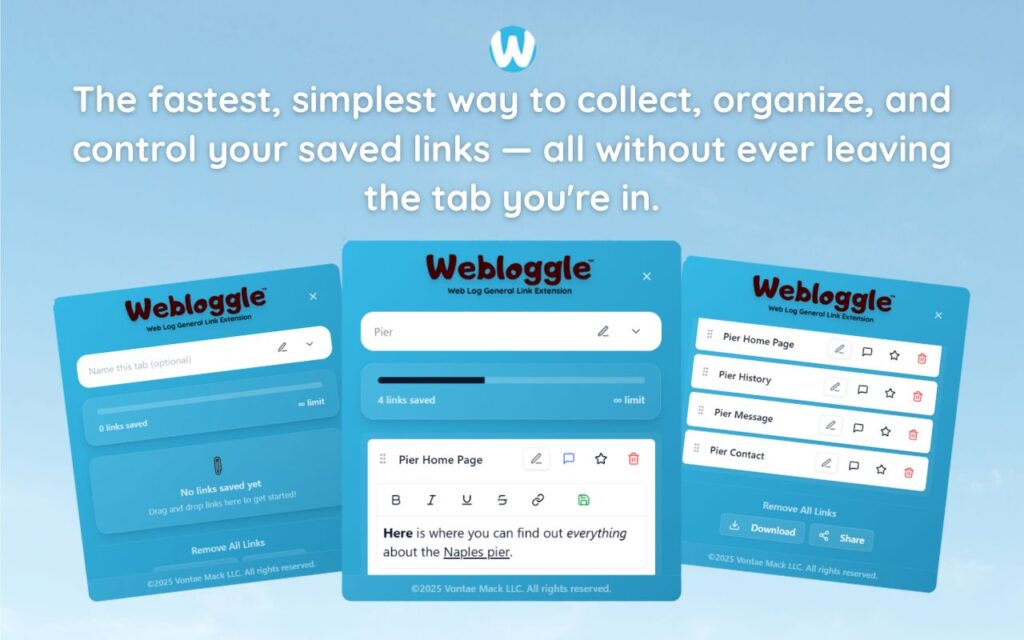
Webloggle makes naming frictionless.
You see a page you want to keep.
You drag it to the icon.
You name it.
You drop it into a box.
You move on.
That’s it.
Now you’re not just saving a page.
You’re saving a thought – inside a workspace – with a name.
It’s not “just a link.”
It’s “Client A – onboarding flow example.”
Not “Article.”
But “Case study to support pricing pitch.”
Now when you return later, you don’t waste time remembering.
You’re back in the flow – instantly.
Named Workspaces Build Mental Continuity
This is the secret of top performers:
They don’t keep everything in their head.
They offload structure into the systems they use.
When your workspace has names, your work has memory.
And when your work has memory, your brain can do what it’s best at: thinking, connecting, solving – not organizing and backtracking.
That’s the power of naming.
It’s not administrative.
It’s strategic.
What Changes When You Name Your Workspace
-
You gain context.
“What is this for?” stops being a question. -
You improve recall.
The act of naming reinforces memory. You’re more likely to remember – and find – what you need. -
You reduce duplication.
You know what you’ve already saved. No more repeating the same steps. -
You create clarity.
You see your work organized – not just saved. -
You move faster.
Because everything you need has a place – and a name.
You’re Already Naming in Other Areas
You name your files.
You name your projects.
You name your playlists.
You name your notes.
Why wouldn’t you name your browser workspaces?
They’re where your most active, dynamic thinking happens.
They deserve structure.
They deserve identity.
They deserve a name.
Final Word
Every time you name a workspace, you reclaim a little control.
You create clarity in a world that thrives on chaos.
You bring intention to the most overlooked part of your workflow.
And you stop treating your browser like a mess of open tabs – and start treating it like the organized engine of your creativity and execution.
That’s what Webloggle is built for.
Not to hold more.
But to name what matters – so you never lose it again.
Free Version
Try Webloggle Free
-
Collect In-tab Links
Drag and drop links into icon or box, right click to save.
-
Edit Link Titles
Name your links whatever you'd like.
-
Create Webloggle Bookmarks Folder
Click the star to create bookmarks of saved links.
-
Limited To The Main Tab Only
Upgrade to Webloggle Pro to use unlimited Tabs.
MOST POPULAR
Webloggle Pro offers you complete control over your tabs.
-
Collect In-tab Links
Drag and drop links into the icon, box, right click to save.
-
Edit Link Titles
Pro offers more robust link naming.
-
Create Webloggle Bookmarks Folder
Click the star to create bookmarks of saved links.
-
Add unlimited notes via WYSIWYG editor.
Bold, Underline, Italics, More Links? Webloggle Pro has you covered!
-
Name each tab individually
Name tab boxes anything you'd like.
-
Choose Tabs by Dropdown
Need to save a link in a different named Tab? With Webloggle Pro you can!
-
Download Your Saved Tabs To Your Computer - Links, Notes, Everything
Webloggle Pro sets your mind at ease with the ability to save all your necessary links, notes, etc to your own computer.
-
Share With Anyone!
Use the Share button in Webloggle Pro to embed your tab information practically anywhere!
Monthly Plan
Webloggle's Monthly Plan offers you complete control over your tabs.
-
Everything in the Yearly Plan is included.
This monthly plan offers everything available in the yearly plan.
