
Why Simplicity Wins: A Love Letter to Browser Tools That Don’t Overthink It
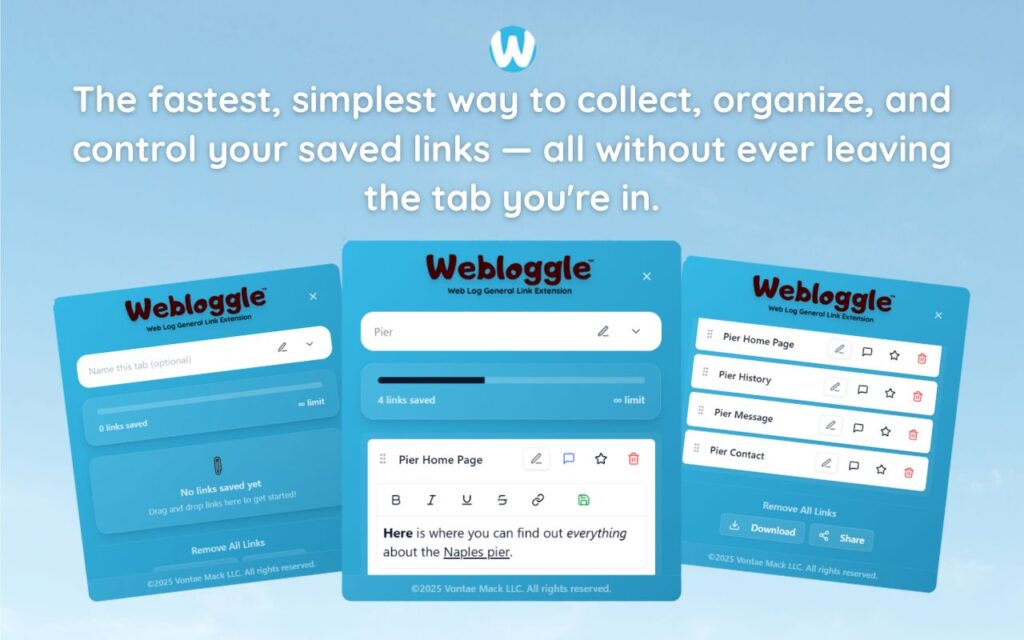
Simplicity doesn’t mean lack.
It means clarity of purpose.
When you strip away the bells, the integrations, the dashboards, and the dopamine-triggering features, you’re left with the hardest thing in the world to design:
Something that just works.
That’s the difference between a tool you use once and a tool you depend on.
The shiny ones impress you.
The simple ones stay.
Let’s talk about Webloggle.
It doesn’t try to run your calendar.
It doesn’t replace your project manager.
It doesn’t sync with 48 apps you don’t even use.
It does one thing.
It helps you remember what matters – right when it matters most.
We’ve Been Trained to Chase Complexity
We think better results require more features.
We believe productivity tools should look impressive, feel powerful, and demand onboarding.
We’ve been sold the myth that friction equals value.
So we load up on tools with roadmaps longer than our to-do lists.
And then what?
We burn out trying to master a system instead of mastering the work itself.
But here’s the truth:
Simplicity is a feature. It’s a choice. It’s a competitive advantage.
Especially when the world is addicted to more.
The Browser Is Where Your Day Happens
It’s your office.
It’s your notebook.
It’s your canvas.
And for most people, it’s also your clutter drawer.
Tabs. Links. Dead ends. Notes you meant to take. Articles you meant to finish. Ideas that flickered and disappeared because you didn’t have a place to put them.
The browser was designed to navigate, not to remember.
Webloggle fixes that.
Not by adding more.
But by adding enough.
One Action. One Result. No Complexity.
-
You find something valuable.
-
You drag it to the icon.
-
You name it.
-
You save it in a box.
-
You move on.
That’s it.
No syncing.
No tagging trees.
No priority labels.
No UI you have to “learn.”
Just a place to store your brain – in the moment, on your terms.
Simplicity Doesn’t Slow You Down. It Sets You Free.
The more complex the tool, the more it demands.
But Webloggle? It respects your flow.
You don’t have to switch modes.
You don’t have to interrupt your process.
It lives in the margin. It whispers, “I’ve got this, go do the next thing.”
And that’s rare.
Because most tools want to be the star.
Webloggle wants to disappear into your habits.
And that’s what makes it powerful.
What’s Missing Is What Makes It Work
There’s no dashboard.
No timeline.
No Gantt charts.
No reminders.
Because the best tools don’t remind you what you should be doing – they make it easier to keep doing what already works.
And the moment you stop worrying about how to organize everything is the moment you actually get more done.
Simplicity Is a Signal
It says:
-
“This isn’t another platform to master.”
-
“This isn’t another inbox to clear.”
-
“This is a trusted place to keep the thoughts you don’t want to lose.”
And you don’t have to read a manual.
You already know how to use it.
That’s not lack of innovation.
That’s design done right.
Final Word
We don’t need more tools with more features.
We need fewer tools with better focus.
Webloggle isn’t exciting because it’s complex.
It’s essential because it’s simple.
It does one job, and does it well:
Catch the thought.
Keep the thread.
Close the tab.
Continue the work.
In a world obsessed with more, this is a tool brave enough to do less—and brave enough to win.
Free Version
Try Webloggle Free
-
Collect In-tab Links
Drag and drop links into icon or box, right click to save.
-
Edit Link Titles
Name your links whatever you'd like.
-
Create Webloggle Bookmarks Folder
Click the star to create bookmarks of saved links.
-
Limited To The Main Tab Only
Upgrade to Webloggle Pro to use unlimited Tabs.
MOST POPULAR
Webloggle Pro offers you complete control over your tabs.
-
Collect In-tab Links
Drag and drop links into the icon, box, right click to save.
-
Edit Link Titles
Pro offers more robust link naming.
-
Create Webloggle Bookmarks Folder
Click the star to create bookmarks of saved links.
-
Add unlimited notes via WYSIWYG editor.
Bold, Underline, Italics, More Links? Webloggle Pro has you covered!
-
Name each tab individually
Name tab boxes anything you'd like.
-
Choose Tabs by Dropdown
Need to save a link in a different named Tab? With Webloggle Pro you can!
-
Download Your Saved Tabs To Your Computer - Links, Notes, Everything
Webloggle Pro sets your mind at ease with the ability to save all your necessary links, notes, etc to your own computer.
-
Share With Anyone!
Use the Share button in Webloggle Pro to embed your tab information practically anywhere!
Monthly Plan
Webloggle's Monthly Plan offers you complete control over your tabs.
-
Everything in the Yearly Plan is included.
This monthly plan offers everything available in the yearly plan.
