
Bookmark Folders Are Dead. Here’s What You Should Be Using Instead
If you’re still saving important links in traditional bookmark folders, you’re using a tool built for a version of the internet that doesn’t exist anymore.
Bookmark folders made sense in 2003. Back when the internet was mostly static pages, forums, and “10 Best” lists you’d revisit monthly. Back when you had the mental bandwidth to remember what “/Articles” or “/Inspiration” actually meant a week later.
But in 2025?
Bookmark folders are dead.
They’re too rigid.
Too hidden.
Too slow.
And worst of all – they don’t match the way you actually work.
Let’s talk about why they failed, and what works better.
The Illusion of Organization
You create a folder called “Marketing.”
You drag a blog post into it.
Then another.
Then three more.
Then you forget it exists.
Six months later, you open the folder. Twenty links. No context. No memory of why you saved any of them. You open three, close them all, and give up.
You didn’t build a library.
You built a junk drawer.
That’s the dirty secret of bookmarks: saving isn’t remembering.
Why Bookmark Folders Don’t Work Anymore
-
They hide what you save.
Out of sight = out of mind. You’re not going to dig through ten nested folders to find a page you saved during a Zoom call six weeks ago. -
They don’t capture intent.
A link named “How to Build Landing Pages” could’ve been for research, for inspiration, for a client presentation, or just a random curiosity. Folders don’t hold why something mattered. They just store what you saved. -
They’re stuck in one hierarchy.
What if something belongs in “Design,” “Marketing,” and “Client Work”? Bookmark folders make you choose. Real work doesn’t live in silos. It lives in overlap. -
They require you to remember what you remembered.
“Was that in /Growth? Or /Strategy? Or /Clients?” You don’t know. So you search. Then you Google again. Then you give up.
What Your Browser Needs Instead
Your browser doesn’t need a filing cabinet.
It needs a workspace.
A living space that reflects what you’re doing right now – not what you hoped to categorize six months ago.
It needs:
-
Speed
-
Flexibility
-
Context
-
Visibility
It needs a way to store ideas, not just links.
And that’s where bookmark folders fail completely.
Introducing Webloggle: Bookmarking for the Way You Actually Work
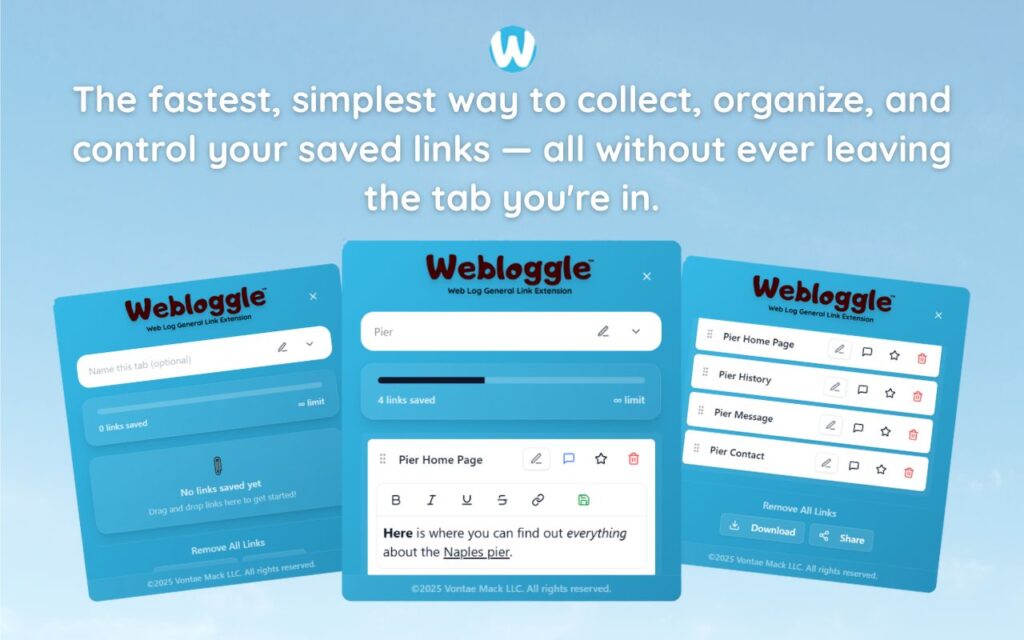
Webloggle isn’t a bookmark tool. It’s a thought capture tool that just happens to live in your browser.
You’re in the middle of something.
You find a link worth keeping.
You don’t want to lose it.
You don’t want to forget why it mattered.
You don’t want to slow down.
So you drag it to the Webloggle icon.
You name the link.
You drop it into a box.
That’s it.
Your browser remembers for you.
Without folders.
Without clicks.
Without friction.
Why It Works
1. Naming creates memory.
When you name a link, you’re labeling the thought – not just the URL. You’ll never again ask, “Why did I save this?”
2. Boxes mirror real projects.
You can have one for “Pitch Deck Research,” one for “Website Redesign,” one for “Book Ideas.” Your boxes change as your work changes. They’re fluid. Like your brain.
3. Instant visibility.
Your saved links are right there. Not hidden. Not buried behind menus. You open Webloggle, and everything you saved is in front of you – ready to go.
4. Fast retrieval.
Need something? Open the box. Find the link. It’s labeled. You remember it. Done. No digging through folders with 300 items named “Home” and “Blog.”
Old Browser Habits Are Costing You
You’re not inefficient because you’re distracted.
You’re inefficient because you keep losing your place.
Every time you re-open the same link you’ve already read…
Every time you re-do research you already did last week…
Every time you let a good idea vanish into a bookmark folder you’ll never open again…
You’re wasting time you don’t have to lose.
Webloggle stops the bleeding.
But What If You Love Your Bookmarks?
Great. Keep them.
Use them like cold storage.
But stop pretending they’re your working memory.
Start using Webloggle for the stuff that’s alive.
The stuff that’s active. In motion. In use.
Save it with meaning.
Label it with purpose.
And close the tab – because you know exactly where to find it later.
Final Thought
Bookmark folders had a good run.
But the internet changed.
Your workflow changed.
Your attention changed.
You don’t need another place to store dead links.
You need a tool that works at the speed of your thoughts.
Webloggle is that tool.
It doesn’t replace your bookmarks.
It replaces your need to use them for everything.
The browser just got smarter.
You just got faster.
Free Version
Try Webloggle Free
-
Collect In-tab Links
Drag and drop links into icon or box, right click to save.
-
Edit Link Titles
Name your links whatever you'd like.
-
Create Webloggle Bookmarks Folder
Click the star to create bookmarks of saved links.
-
Limited To The Main Tab Only
Upgrade to Webloggle Pro to use unlimited Tabs.
MOST POPULAR
Webloggle Pro offers you complete control over your tabs.
-
Collect In-tab Links
Drag and drop links into the icon, box, right click to save.
-
Edit Link Titles
Pro offers more robust link naming.
-
Create Webloggle Bookmarks Folder
Click the star to create bookmarks of saved links.
-
Add unlimited notes via WYSIWYG editor.
Bold, Underline, Italics, More Links? Webloggle Pro has you covered!
-
Name each tab individually
Name tab boxes anything you'd like.
-
Choose Tabs by Dropdown
Need to save a link in a different named Tab? With Webloggle Pro you can!
-
Download Your Saved Tabs To Your Computer - Links, Notes, Everything
Webloggle Pro sets your mind at ease with the ability to save all your necessary links, notes, etc to your own computer.
-
Share With Anyone!
Use the Share button in Webloggle Pro to embed your tab information practically anywhere!
Monthly Plan
Webloggle's Monthly Plan offers you complete control over your tabs.
-
Everything in the Yearly Plan is included.
This monthly plan offers everything available in the yearly plan.
