The Browser Was Never Built to Handle Your Life — Until Now
The browser is the most-used tool on your computer. You start your day in it. You work in it. You shop, communicate, research, plan, read, and build in it. It’s where your ideas form, your tasks take shape, and your life unfolds – one tab at a time.
But here’s the hard truth:
Your browser was never designed to handle all that.
It was built to browse – not to hold, organize, or preserve.
It’s an incredible window into the world.
But as a workspace? It’s broken.
And if you’ve ever lost an important link, reopened the same site five times in a week, or stared at 40 tabs with no clue what any of them are for – you already know.
The browser is trying to keep up with your life.
It just can’t.
At least, not without help.
The Original Purpose of the Browser
Let’s rewind.
The browser was built for navigation.
To get you from one place to another.
To display websites.
To show you the internet.
It wasn’t meant to store knowledge.
It wasn’t meant to manage context.
It wasn’t meant to serve as a project tool, a memory bank, or a digital desk.
But somewhere along the way, we all started living inside it.
And the browser didn’t evolve fast enough.
So we patched the gaps:
-
Bookmarks
-
Extensions
-
Note-taking apps
-
Screenshots
-
Emailing ourselves links
-
Leaving tabs open “just in case”
We created a Frankenstein system just to survive the flood of information.
But survival isn’t the goal anymore.
Now we need a browser that actually works like we do.
Why Modern Life Outgrew the Browser
We don’t just visit websites now.
We build entire workflows inside them.
-
Your writing lives in Google Docs.
-
Your design lives in Figma.
-
Your tasks live in Notion or Trello.
-
Your meetings live in Calendar.
-
Your research lives in blogs, PDFs, and rabbit holes.
-
Your inspiration lives in product pages, portfolios, tweets, and dashboards.
All of this happens in tabs.
But tabs are thin. Fleeting. They carry no memory. No organization. No meaning – unless you give it to them.
You can’t name them.
You can’t group them natively in a lasting way.
You can’t label what you’re doing or why.
So what happens?
You leave tabs open too long.
You forget why they matter.
You avoid closing them.
You lose context.
You lose energy.
You lose track.
And the more ambitious your work, the faster the system collapses.
The Emotional Cost of a Broken Browser Workflow
Most people think digital clutter is just annoying.
It’s not.
It’s expensive.
-
You lose time redoing work you already did.
-
You forget resources you meant to use.
-
You drop threads that could’ve turned into projects.
-
You feel overwhelmed every time you sit down to “catch up.”
-
You’re constantly starting from zero.
It’s not your brain that’s broken.
It’s your browser that’s letting you down.
And until that changes, no productivity tool is going to fix the core issue.
Enter Webloggle: The Browser, Upgraded
Webloggle isn’t a new app.
It’s not a replacement for your tabs.
It’s the layer your browser always needed – and never had.
Here’s what it does:
-
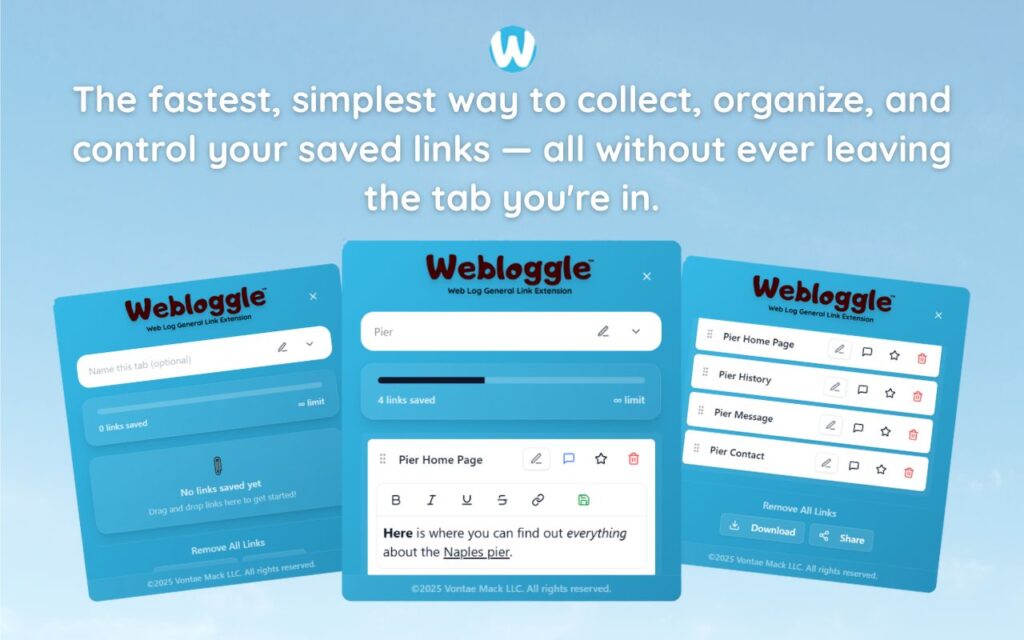
Lets you drag links into a persistent, always-accessible dropbox.
-
Lets you name those links with your words.
-
Lets you group links into labeled boxes that reflect your projects.
-
Lets you close tabs with confidence – because you know you saved them.
-
Lets you return to work with clarity – because your system didn’t forget.
This isn’t about memory.
It’s about momentum.
You’re not storing pages.
You’re storing purpose.
Why Simplicity Wins
We’ve all tried the heavy tools.
-
The all-in-one dashboards.
-
The project management monsters.
-
The “second brain” systems that feel like another job.
They’re powerful – but they ask too much.
You have to set them up, maintain them, think about them, remember to use them.
Webloggle doesn’t ask anything.
It’s just there – quiet, light, fast.
You see a link.
You save it.
You name it.
You move on.
That’s the flow.
That’s the fix.
A Browser That Thinks With You
When you start using Webloggle, your browser stops being a blank slate and starts becoming aware.
You open it up, and it reminds you:
-
Here’s where you left off.
-
Here’s what mattered yesterday.
-
Here’s what you don’t have to search for again.
It becomes a true digital desk.
Not just a place to browse, but a place to build.
Not just a way to view, but a way to think.
That’s what we’ve been missing all along.
Real Work Needs Real Memory
We say we work in projects – but our tabs don’t reflect that.
We say we want focus – but our browser is scattered.
We say we’re trying to be more efficient – but we lose hours to the same invisible friction every day.
It’s time to stop treating your browser like it’s only a window.
It’s a workspace.
And it needs tools that understand that.
Final Word
Your life outgrew the browser years ago.
You just didn’t have a way to make it work for how you think now.
Webloggle doesn’t change the browser.
It completes it.
One saved link at a time.
One named idea at a time.
One less thing to forget – so you can do more of what matters.
Finally, a browser that’s built to keep up with you.
Free Version
Try Webloggle Free
-
Collect In-tab Links
Drag and drop links into icon or box, right click to save.
-
Edit Link Titles
Name your links whatever you'd like.
-
Create Webloggle Bookmarks Folder
Click the star to create bookmarks of saved links.
-
Limited To The Main Tab Only
Upgrade to Webloggle Pro to use unlimited Tabs.
MOST POPULAR
Webloggle Pro offers you complete control over your tabs.
-
Collect In-tab Links
Drag and drop links into the icon, box, right click to save.
-
Edit Link Titles
Pro offers more robust link naming.
-
Create Webloggle Bookmarks Folder
Click the star to create bookmarks of saved links.
-
Add unlimited notes via WYSIWYG editor.
Bold, Underline, Italics, More Links? Webloggle Pro has you covered!
-
Name each tab individually
Name tab boxes anything you'd like.
-
Choose Tabs by Dropdown
Need to save a link in a different named Tab? With Webloggle Pro you can!
-
Download Your Saved Tabs To Your Computer - Links, Notes, Everything
Webloggle Pro sets your mind at ease with the ability to save all your necessary links, notes, etc to your own computer.
-
Share With Anyone!
Use the Share button in Webloggle Pro to embed your tab information practically anywhere!
Monthly Plan
Webloggle's Monthly Plan offers you complete control over your tabs.
-
Everything in the Yearly Plan is included.
This monthly plan offers everything available in the yearly plan.
