
What a Realtor, a Writer, and a Chef Have in Common (Hint: Tab Chaos)
At first glance, they couldn’t be more different.
The realtor is tracking listings, comps, inspections, and deals- juggling negotiations, follow-ups, and property details in real time.
The writer is researching, drafting, rewriting, rewriting again, and diving into rabbit holes of source material that almost, maybe, possibly matters.
And the chef? She’s sourcing ingredients, watching plating techniques, referencing seasonal produce, all while scanning menus, reviews, and vendor sites.
Three different lives. Three different tools. Three different forms of expertise.
But pull up their browsers and you’ll see the exact same thing:
Tab chaos.
Because Here’s the Truth: It’s Not About the Industry. It’s About the Brain.
The open tabs aren’t random.
They’re attempts to hold onto something.
An idea.
A reference.
A task to revisit.
A tool they’ll need in twenty minutes, or twenty days.
And they all know the fear:
“If I close this, I’ll never find it again.”
So they keep everything open.
The tab bar becomes a mental parking lot. A graveyard of intention. A stack of deferred decisions.
But here’s the kicker: none of them think they have a system problem.
They think it’s just part of the job.
The Real Problem Isn’t Volume. It’s Context.
A chef’s third tab over might be a spice blend from a niche importer.
The realtor’s is probably a city zoning map.
The writer’s? A 2007 blog post with the perfect quote.
But the tab itself doesn’t tell them that.
It says Home.
Or Pricing.
Or Blog.
It’s a digital mystery box.
The only person who knows what it means is the one who opened it – and they won’t remember in 48 hours.
That’s not a workflow.
That’s a slow leak of cognitive power.
Professionals Don’t Rely on Hope. They Build Habits.
Here’s what separates the overwhelmed from the high-output:
They capture meaning.
They don’t just “keep a tab open.”
They name it.
They don’t just save a page.
They file it.
And they don’t rely on memory.
They build a system they trust.
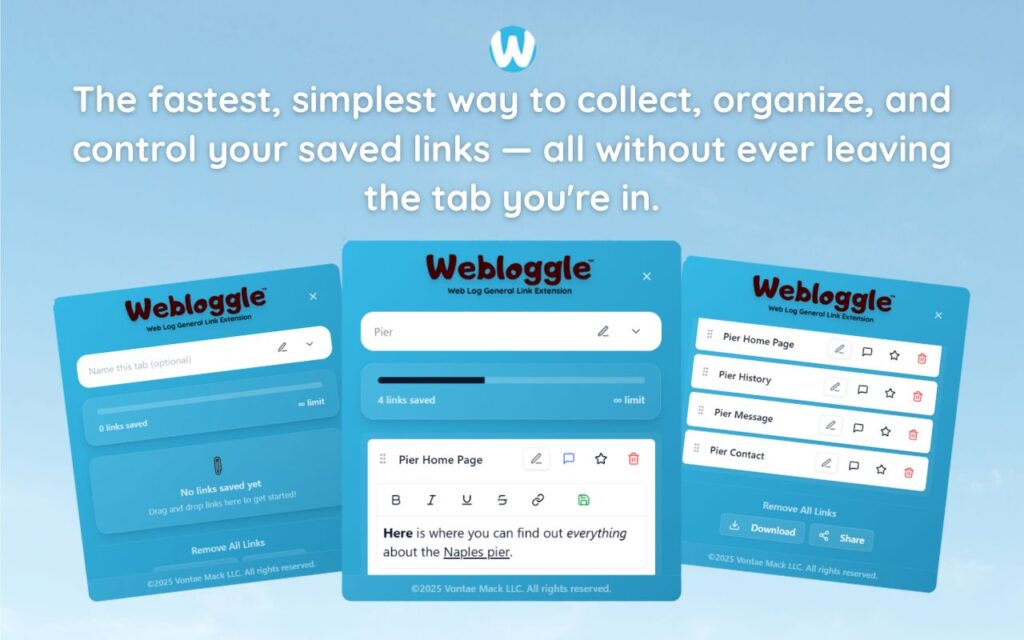
That’s where Webloggle comes in.
Webloggle Is What Happens When You Give Your Browser a Brain
Drag the tab.
Name the idea.
Drop it in a labeled box.
Close it.
Done.
You didn’t lose it.
You didn’t forget it.
You didn’t just “hope” you’d remember.
You built clarity.
Three People. One Problem. One Shift.
The realtor comes back from a showing. Opens Webloggle. Finds every resource saved under “Client – 47 Maple.” There’s the permit page. The quote. The listing comp. All there. Ready.
The writer sits down to draft. Opens “Character Research.” There’s the link to that folklore article. The perfect turn of phrase. The studies on migration patterns. No panic. Just flow.
The chef updates a seasonal menu. Opens “Fall Plating.” There’s the visual inspiration. The food styling notes. The link to the local mushroom supplier. She’s not searching. She’s starting.
Same fix. Same freedom.
Different game.
Final Word
It’s not about your profession.
It’s about your process.
Whether you’re selling homes, writing novels, or serving up a ten-course tasting menu – the biggest productivity unlock isn’t more effort.
It’s structured thought.
One habit.
One shift.
One tool.
Capture it.
Name it.
Move forward.
That’s Webloggle.
And it’s not just for people like you.
It’s for exactly people like you.
Free Version
Try Webloggle Free
-
Collect In-tab Links
Drag and drop links into icon or box, right click to save.
-
Edit Link Titles
Name your links whatever you'd like.
-
Create Webloggle Bookmarks Folder
Click the star to create bookmarks of saved links.
-
Limited To The Main Tab Only
Upgrade to Webloggle Pro to use unlimited Tabs.
MOST POPULAR
Webloggle Pro offers you complete control over your tabs.
-
Collect In-tab Links
Drag and drop links into the icon, box, right click to save.
-
Edit Link Titles
Pro offers more robust link naming.
-
Create Webloggle Bookmarks Folder
Click the star to create bookmarks of saved links.
-
Add unlimited notes via WYSIWYG editor.
Bold, Underline, Italics, More Links? Webloggle Pro has you covered!
-
Name each tab individually
Name tab boxes anything you'd like.
-
Choose Tabs by Dropdown
Need to save a link in a different named Tab? With Webloggle Pro you can!
-
Download Your Saved Tabs To Your Computer - Links, Notes, Everything
Webloggle Pro sets your mind at ease with the ability to save all your necessary links, notes, etc to your own computer.
-
Share With Anyone!
Use the Share button in Webloggle Pro to embed your tab information practically anywhere!
Monthly Plan
Webloggle's Monthly Plan offers you complete control over your tabs.
-
Everything in the Yearly Plan is included.
This monthly plan offers everything available in the yearly plan.
